javascript
33 TopicsCapturing Text from a Shape or TextBox
I have a game with 40 questions, subdivided into 4 categories. I've created an object for each category and used states for each question within the category. My current plan is to enter the questions in the WYSIWYG environment for easier proof reading than if I tried to enter them into the Variables editor. It's a team based game and if nobody can get the answer right, I want it to save the question to a variable, then at the end of the game, I want it to email the questions to the SMEs. My problem is that unless I switch to using 40 variables, I haven't figured out a way to pull the question from the object before moving on to the next question. I had thought it would be something simple like this: const jsObject = object('6N5bhivlzyV'); set jsText = jsObject.value; setVar('theText',jsText); But, that's not working. Is my javascript bad or is there a way to do this with standard triggers?Solved812Views0likes3Comments(loading) speed of Storyline 360 slides
Hi all, Does anyone know what influences the loading time of storyline 360 slides? We are creating educational games with storyline, and are trying to figure out how we can decrease the amount of loading (with the three loading dots) between slides. I have a few ideas on what impacts the slide loading time, for example: Amount of layers on a slide Amount of objects on a slide Amount of images in a slide The length of javascript functions The amount of audio files The size of audio files The amount of video files And maybe other that I haven't thought of yet.. And a few questions: Does it matter if you put objects / images / video / audio on timeline start, or after let's say 1 second? How does Storyline internal "pre-load" slide work? I have read somewhere it makes an educated guess which slide comes next, and preloads it. But, as we make a slide selection based on variables, that won't work. Is there any way we can feed storyline information about the upcoming slide, so it can preload it already? I'm very curious to your insights. I will also do some research myself the next few months, and share the outcome, but it will help to gather some input and thoughts from other users before diving in further!802Views1like3CommentsCost Estimate
Hi everyone, My company recently developed a children's app using .NET MAUI. It was a slow and expensive process. Plans for an new app are in the works, and the goal is to build a hybrid app this time, leveraging the company's Articulate 360 subscription. As part of a proof of concept exercise, a developer recently used Articulate 360 and Java to recreate several games that were featured in the original, native app. They were exported in a SCORM format and the games actually functioned better than their native counterparts. They also took FAR less time and money to complete. I'm trying to estimate the cost of developing the new hybrid app, and I need someone who has both a developer background and Articulate 360 knowledge. I'm on the content creation end, and this is not my area of expertise. I realize I may be casting a line in the wrong place, but if anyone out there could offer advice, including a better place to search for answers, I'd really appreciate it. Thank you!Solved763Views0likes5CommentsJavaScript Timer Question
Hello! I'm new to using JavaScript in Storyline. But after watching a Learning Dojo video and using Claude to help me put some code together, I was able to come up with the following code to use in an "execute JavaScript" trigger that happens when the learner clicks the Start button for a matching game. My goal is to start a timer when they start the game. It counts in seconds and shows on the screen as they go through the game. When the learner completes the game, it shows them how many seconds it took them. All of that works one time. But if the learner clicks to restart the game, the original timer is still counting from the first go-around, plus a new timer is started, such that it flashes back and forth between one counter and the other. I can't figure out how to stop the timer, reset it, and allow them to start over. Claude suggested the code where it "clears any existing timerId stored in Storyline" -- but while a new timer starts, the old one still keeps going. Is there any solution to this? Thanks for any help! //Getting the player const player = GetPlayer(); //Where to start let sec = 0; //Set up the timer function startTimer() { sec += 1; player.SetVar("timer", sec); } //Clear any existing timerId stored in Storyline let existingTimerId = player.GetVar("timerId"); if (existingTimerId !== null && existingTimerId !== undefined) { clearInterval(existingTimerId); } //Reset the counter sec = 0; player.SetVar("timer", sec); //Start the timer and store the ID in Storyline let timerId = setInterval(startTimer, 1000); player.SetVar("timerId", timerId);Solved842Views1like2CommentsScrolling with JS
I use a lot of scrolling, so I added here two types with simple JS (just copy and paste from YouTube comments) 1. Scrolling the entire slide is useful for simulating interfaces like Figma or large canvases. Zoom in/out with Ctrl+Scroll and move around freely. 2. Auto-scrolling a panel – perfect for text boxes or scrolling objects. When the slide loads, the content scrolls down smoothly to show that it’s interactive. This is the link to see how: https://youtu.be/TanOufT30vE?si=9XmJEWfe7ky6HNIQ489Views1like3CommentsCode Terminal Simulation
Hi, I needed to create a code terminal for the learner to type in the code and get the feeling that it is a real terminal, and also get some kind od an imidiate feedback so they can spot the mistake on the spot. I built this with JS, and the code is in the YouTube comment with an explanation, so if you want to change colors and more, you'd know where, even if you are not a JS developer. Maybe it will help others too, and if so, enjoy! https://youtu.be/PWDxqyq4sRo?si=zvonqvBNmobFum3n277Views2likes0CommentsButton Listener to move a character
Hello everyone I've dealing with a problem, I started a project, it is supposed to be an Escape Room, and most of the things I need for it are already available on Storyline. But I've been stuck on the movement of the character, it is a simple 2D movement, right and left, inside the room. The problem is: I already got it to move on a click, but it is just on that click, I want it to move as long as I keep the button pressed. This is the last JavaScript I tried to make it move: const button = object('5yfHufFxicy'); function moveWhilePressed() { button[i].addEventListener("mousedown",() =>{ const player = GetPlayer(); player.GetVar("MousePressed"); const currentX = player.GetVar("MoveX"); player.SetVar("MoveX", currentX +1); setTimeout(moveWhilePressed, 100); const objects = [ object('6EPGwyDzEfX'), ]; const positions = objects.map(obj => ({ x: obj.x})); objects.forEach((obj, i) => { obj.x = positions[i].x+currentX; }); }); } moveWhilePressed(); Not sure if I'm wrong on the EventListener, before I added it, the character moved, but the moment I clicked, it kept moving without the button pressed. I tried using Variables, but the result was the same, the character kept moving.Solved995Views1like4CommentsSetting the state of an object to "Disabled" or "Hidden"
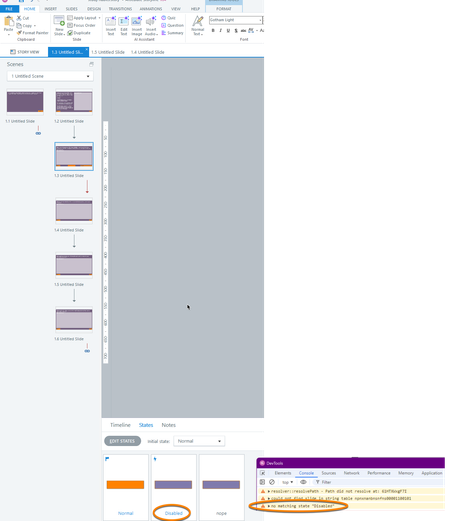
Has anyone bumped into an issue of not being able to use JavaScript to change the state of an object to the built-in "Disabled" or "Hidden" state? I'm able to set to "Normal" and any custom states, but for some reason, those two just do not work and pop an error in the console saying these are not valid states. See screenshot for an example:205Views1like2CommentsTop-Down game mechanics in Storyline
I was fooling around with the new API and created a proof of concept for some mechanics of a top-down game. You can use the WASD keys to move the robot around. If you roll close to objects, I set a variable that allows a layer to open. Unfortunately, the built in Intersection triggers don't work when you move objects with API method, so you need it to do it through JavaScript. If you move the robot off screen to the right, it will go to the next screen in the correct position it left. Try going back higher up and see how it works. The current demo only allows you to go to slide (or room) 3 and back. I can get the coordinates of a character object and then since you know the slide size, you can trigger variables to get you to the next slide and back. I also built some logic in to prevent the robot from going too far up or too far down. On the last slide that you can get to through the menu, you will notice a demo of a platform concept. Move the oval using the keys and notice that we can simulate gravity like any game engine. I imagine if I implemented the same positional logic that we could create a simple platformer but haven't got there yet. Full disclosure: All assets are generated using ChatGPT 4.0 except for the ovals and the rectangles. 😉 Take a look here. https://360.articulate.com/review/content/6104372d-85cf-41cc-8f81-6f42e3a6c061/reviewSolved1.1KViews4likes5CommentsRIVE animations in Storyline
I was curious if anyone has used RIVE for interactive elements in Storyline. I know they can be imbedded in the JavaScript, but I was wondering if you could use the listeners for interactivity within a Storyline project. Any guidance would be appreciated. I'm not sure if I'm barking up the wrong tree or not.233Views1like0Comments