nova ai
3 TopicsI Was Wholly Unprepared for NOVA’s Translation and Localization Power!
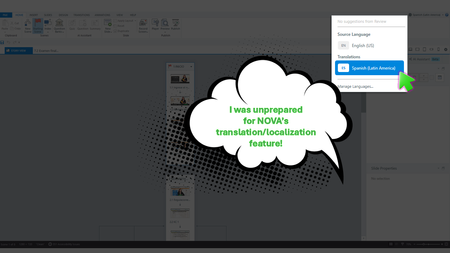
Yup, We Need This Course Updated by Next Week During the week of Articuland Orlando, my business partners dropped an “immediate need” eLearning build in my lap. At first, I didn’t think it would be a huge lift. Then I realized I had to fine-tune the English version of an existing course and create a Spanish version. Typically, translating a course from English into Latin American Spanish can take us two to four weeks. After I use Copilot to translate the course's script, an internal expert validates the translation. I then make the necessary changes, and the expert confirms that the revisions are correct. The challenge is that my internal expert has a full-time role with the company, so reviewing eLearning translations naturally falls lower on their priority list. When Articulate announced during the keynote that NOVA’s translation and localization feature had been activated for Articulate360 subscribers, I was literally in the middle of translating my course (MANUALLY). What Can It Hurt - Take NOVA for a Spin I said, “What the heck. Even if Storyline is able to only translate the base layer’s onscreen text, that’s a win.” Mind blown, when NOVA translated nearly everything!🤯🤯🤯 It translated: Onscreen text (base layer) Onscreen text (layers) Onscreen text (Master slides*) Changed the language the player was set up in AI Voiceover audio Lessons learned Written Spanish, typically, runs longer than written English. Resizing your text boxes etc. takes time, even with the tool that spotlights exactly where the issues are. *Some Master Slide (layouts) were translated, some were not. I was not working on a highly complex course, so fixing the lingering untranslated Master Slide (layouts) was not a big deal. As mentioned in Articulates Help documentation, when you have hardcoded text onto an image, that will not be translated. I can’t share a full demo, but I captured a few screenshots for your perusal (see below). My Key Takeaway Bottom line, the time NOVA saved us is remarkable. I was so excited, I nearly called my manager to rave about it (even though she was on vacation 🤣🤣).120Views8likes5CommentsWork from Home: Flexibility Meets Productivity
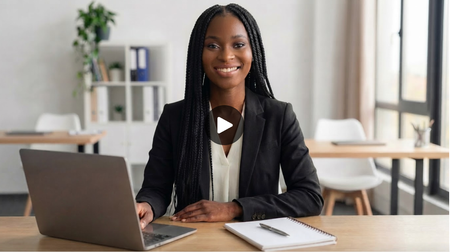
Hi everyone! I created this microlearning using Nova's presenter-style video feature, and I’m really excited about the possibilities it offers. This tool opens up new opportunities to create learning experiences that are engaging, meaningful, and memorable for learners. Work from Home: Flexibility Meets Productivity | Rise 36066Views2likes1CommentMixed Emotions
The training I create is for a manufacturing facility, forging to be precise. It is also heavily based on standards, dry, boring material in other words. I decided to give avatars a try to get across key points instead of having the learner have to read a bunch of bullet points. What I discovered with the avatar tool: There aren't many "industrial" avatars that fit right out of the box. I have to provide extensive details in my prompt to get close to what I am wanting to portray. It kinda defeats the quick creation process. For example, there are only 3 industrial options, only one of them actually have safety glasses on and she is sitting on a forklift. I used that one and changed the background, but her features and movements were "off". Trying to get a background environment that resembles our facility is impossible. I have tried several detailed prompts and edits, and still get backgrounds that don't really match. I'm sure I need to improve on my prompt writing, but it was still so time consuming to get close to what I wanted without it looking completely fake or "futuristic" that I gave up and settled for an office setting. I also found his facial expression didn't change much even though I used the expressive descriptions option in the create AI text. I did find that getting key points across is much easier and the associates can relate better than just reading a bunch of words. I will continue to work with creating avatars and I'm sure eventually I will be able to get very close to the avatar I want. That's why I am glad there is the option to save your avatar.8Views0likes0Comments