project management
13 TopicsMy Custom Rise Block Component Library
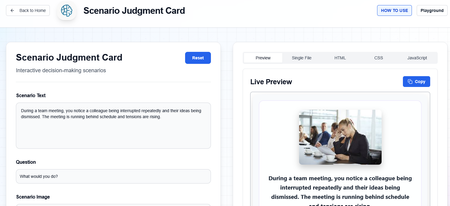
Hi everyone! I wanted to share a custom library of Rise-compatible interactive components I’ve been building and experimenting with for eLearning projects. The library includes custom-designed blocks and interactions intended to help make Rise courses more engaging, flexible, and visually dynamic beyond the default block set. You can explore the library here: https://cognitoblox.netlify.app/ This is an ongoing project, and I’d genuinely love feedback from the community: Which components do you find most useful? What kinds of interactions would you like to see added? Any ideas for improving usability or accessibility? Happy to connect with fellow developers who are experimenting with custom Rise code blocks as well! Thanks for checking it out1.2KViews21likes20CommentsSwatch Library
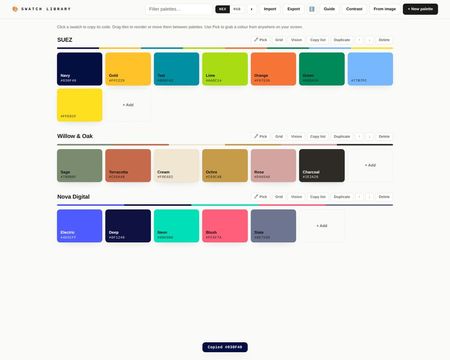
With Swatch Library you can create a palette per brand or project, and every swatch is one click to copy, in hex or RGB. Use it free right inside a Rise course or online. Type or paste a code, bulk-paste a whole list at once or, in Chrome/Edge, use the eyedropper to pick colours from anywhere on your screen, a client's website, a brand PDF, a Storyline slide. You can drop a logo or brand asset onto the tool and it will pull the dominant colours out and build a palette from them. Everything happens in the browser, nothing is uploaded anywhere. Beyond that there is a WCAG 2.2 contrast checker built in, set a foreground and background colour, get the ratio, and see pass/fail for AA and AAA body text, large text and non-text elements like icons and focus indicators. That is useful enough on its own, but the thing I am most pleased with is the contrast grid. Each palette has a Grid button that opens a matrix of every colour pair in that palette, painted with the actual pair so you can see at a glance which combinations work for text and which do not. One click on any cell opens the full checker for that pair. If you have ever wondered whether your brand colours are actually safe to use together, this answers it quickly. There is also a colour vision preview. A Vision button on each palette shows it as it appears to people with protanopia, deuteranopia and tritanopia, plus a greyscale row for print. It automatically flags any pairs that become hard to tell apart, named with their perceptual distance score. Each swatch has a tints and shades button that opens a nine-step ramp from light to dark, and you can click any step to copy it or add it to the palette. Useful for hover states and backgrounds. You can drag swatches to reorder or move them between palettes, filter palettes once your library grows, and use Export/Import to back everything up or share a brand palette file with your team so everyone's working from the same set. There's a built-in guide for the full tour. It can be used directly in the linked Rise course, or used online via the link. All free, no downloads, no signup, no nonsense! Swatch Library - Rise Swatch Library - Online278Views3likes1CommentGamified Onboarding
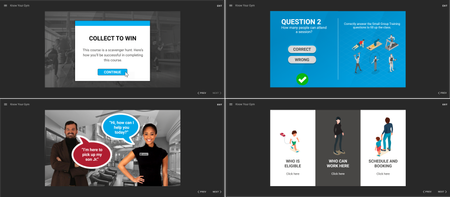
Collect the gems by exploring the office! This gamified eLearning was developed for team members to explore their workspace while getting some product knowledge. The process: Conducting a training needs analysis through discussions with leaders Building a learner persona using surveys and polls Planning the desired outcomes Create a fun course Explore the project.2.8KViews12likes8CommentsAI-Powered Lessons-Learned Workflow for Project Teams
Are you ready to transform how your project team captures and reuses critical knowledge? In this course, you’ll discover how to harness generative AI to streamline lessons-learned processes, eliminate manual bottlenecks, and institutionalize organizational learning. Explore the real challenges project teams face, see prompt engineering in action, and learn how to implement governance protocols that ensure trust and security. By the end, you’ll be equipped to design, deploy, and scale an AI-assisted knowledge management workflow that delivers lasting value to your organization.469Views0likes0CommentsSanta's Naughty or Nice List
Happy Holidays, everyone! I recently built a sorting exercise for a client which used Javascript to split the learner's text entry answer into individual sentences and display these as draggable Post-It notes. The learner was then asked to sort the Post-It notes into 'good' and 'bad' ideas. Which got me thinking... could Santa use a similar method to decide who's been naughty or nice? In this Christmas-themed version, I've simplified the Javascript to recognise only individual words (by space or line break) and generate up to 10 Post-It notes for the sorting exercise. // Get the learner's response from the Storyline text variable var player = GetPlayer(); var learnerResponse = player.GetVar("Christmas_List"); // Split the text into individual words // This handles multiple spaces, line breaks, and other whitespace var words = learnerResponse.split(/\s+/); // Remove any empty strings from the array words = words.filter(function(word) { return word.trim().length > 0; }); // Assign each word to numbered variables (Person_1, Person_2, etc.) // Limited to 20 slots var maxSlots = 20; for (var i = 0; i < words.length && i < maxSlots; i++) { var varName = "Person_" + (i + 1); var trimmedWord = words[i].trim(); player.SetVar(varName, trimmedWord); } // Optional: Store the total number of words processed player.SetVar("TotalWords", Math.min(words.length, maxSlots)); Each of the 10 Post-It notes only becomes visible if a name has been assigned to it. Depending on the split between 'naughty' and 'nice', you'll see a different video message from Santa. I created the Santa videos with Powtoon's AI Text to Video tool. Warning: it's Drag and Drop As fun as this is, Drag and Drop isn't fully accessible, and I'm still tinkering with the master file to see if I can add keyboard fallback controls and preserve the counting system. Watch this space! Play here! 424Views2likes1Comment
Ai-powered Learning Companion
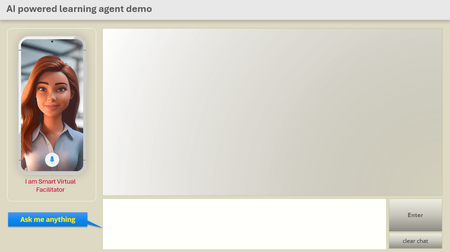
AI-Powered Agent I’m exploring ways to integrate AI-powered agents into digital learning to make courses more interactive, responsive, and personalized. Imagine learners engaging in real-time conversations, receiving instant answers, and practicing realistic scenarios all within the course itself. Learners go beyond just reading or clicking they can ask questions, get immediate feedback, and practice real conversations directly inside the course. Currently in the early testing phase, the results are already showing promise in boosting engagement and personalization. While there is some response latency, the potential for transforming digital learning experiences is immense. #AI-Powered Learning Agent #AI-Powered Interactive Coach #Smart Virtual Facilitator #AI Learning Companion #AI-Powered Learning Agent #Real-Time GPT Assistant #Storyline openAIConnector https://shorturl.at/VcvzM716Views2likes3CommentsTricks with JavaScript & On-Brand Storyline Design
Hey everyone! 👋 I’ve been experimenting with ways to make the built-in Storyline 360 player look and feel less default and more on-brand — without rebuilding the player from scratch. Using just a few lines of JavaScript on the Slide Master, You can: 🎨 Change the sidebar and bottom bar color 📝 Style the menu text 🍔 Remove the hamburger icon ➡️ Rename the “Next” button ✨ Add a custom border for visual flair These tweaks helped me align the course with my client’s brand while still using the native player features. 📺 If you're curious, I shared a walkthrough and examples on my new YouTube channel: 🔗 [https://youtu.be/kIwjijlsApY?si=9cHpHHlVNYVnhz5x] I’d love your feedback or to hear how others are customizing the player too! #Storyline360 #JavaScript #CustomPlayer #eLearningDesign #OnBrand 712Views4likes2Comments