sliders
3 TopicsHow to Turn a Slider into a Quiz Question
This tip comes from our certified training partner, Yukon Learning. Sliders a fun way to create interactive elements on a slide in Storyline, and you may have used them to do things like show a timeline of events or even used them in a gamified slide. But did you know that you can you use them to answer quiz questions? In this video, we'll show you how to use slider values to control a freeform multiple choice question. You'll learn how to: Add a slider to your freeform quiz slide Adjust slider design properties Link slider stopping points to quiz answers using triggers Resources: Yukon Learning YouTube Channel Sign Up for Facilitated Certified Training288Views2likes0CommentsSnapshot graphics + click-and-reveal = engaging cybersecurity learning
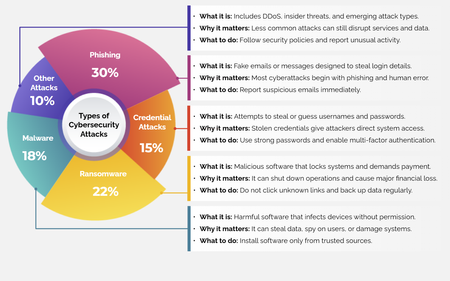
For this week’s challenge, we used snapshot graphics and a click-and-reveal interaction to help learners quickly recognize common cyber attacks—without overwhelming them. View the activity using the link below. https://www.swiftelearningservices.com/custom-elearning-snapshot-graphics-click-reveal-cyber-security-attacks/247Views2likes0CommentsTip of the Iceberg
Happy New Year! When I take part in a Challenge, I'm often asked, "How long did it take you to build that demo, Jon?" The answer can vary, depending on whether I'm experimenting with a new feature, revisiting an earlier concept, or building something completely new. What you see is just "the tip of the iceberg". The next question is: "Is the juice worth the squeeze?" Maybe. Maybe not. Depends on the project, your audience, and the subject matter. Remember, interaction doesn't always aid knowledge transfer. But by regularly practicing with your tools, you can bring your development time down, and make interactions like this one more viable on a real project. Click below to test the demo for yourself, and let me know what you think. https://bit.ly/elhc536 393Views3likes2Comments