studio 360
970 TopicsSlider Bug
Hey everyone! I'm making a slider interaction with two separate sliders that will populate variables on a page. Slider one (the hand on the wrench) seems to work just fine, but slider two (the weight on the rectangle) will automatically move the hand on the wrench to a new position whenever it is moved. I do not want the hand to be moved by the weight. What bug caused this and how to I fix it? I've looked at the triggers and played with reordering them to no avail. UPDATE Was able to resolve it by using separate variables set equal to the slider variables. :) Thank you for your help!Solved153Views0likes8CommentsArticulate presenter with AI feature 365 Plus
There many Microsoft 365 AI feature that can be utilised to enhance Articulate Presnter with animation, AI audio, video quiz, Claude content creation, and Copilot content creation integration and animation synchronisation. Hope Articulate is doing innovation in this AI era. Best, Siba Prasad PadhiModify the Results Slide in a Freeform question -Quizmaker & Storyline
Quizmaker question I'm trying to build an aptitude style assessment for a stand alone micro-course. It would have users choose between an A, B or C selection. First, i'm playing with Quizmaker to see how the freeform question might work -may retry this in Storyline later, but so far I'm stuck on something that is in both software. The Results slide, which I indent to use in this assessment, I cannot find a way to have more options than just Success / Failure. I can use the points per question to tally up the likelihood of "X" then funnel the user into a "Recommendation" (i.e. a relabeled Results slide) that indicates Type A and Type B. This is fine to repurpose Success / Failure, but my plan is to have Type C. Any ideas how I can have the Results slide to have a 3rd option? Or am I maybe thinking about this too narrowly? Any advice or ideas would be appreciated. KAutoplay Youtube videos in Storyline
Hello! I need help with auto playing my YouTube videos. Is it still true that it won't work in Chrome? The embed code is: <iframe width="560" height="315" src="https://www.youtube.com/embed/3Op4hV4Hkcg" title="YouTube video player" frameborder="0" allow="accelerometer; autoplay; clipboard-write; encrypted-media; gyroscope; picture-in-picture; web-share" allowfullscreen=""></iframe> Also, once the video is done how do I get the slide to auto advance?153Views0likes2Commentslack of Rise innovation
Just talked to a former customer who went to Mindsmith because of the lack of innovation in Rise over the past four years. Groups like Maestro are filling in the gaps but I'm curious if others are leaving Articulate for competitors because of similar sentiment. I hope not. I spent the last year learning Rise and Storyline. Hoping this discussion prompts a conversation that gets engineering's attention and where we might hear about the future. ANNNNNDDDDD - everyone is doing AI innovation. What other features besides integrating with AI partners can we look forward to in the near future? Excited to hear more!1.5KViews2likes22CommentsReview not loading in Chrome or Edge
Greetings, I'm publishing courses on Review and they show up on my browser normally whitout problems. I'm trying to send Review links to my clients, but they responded that they cannot load the courses with Google Chrome or Microsoft Edge. The course loads its 3 dots animation... and then a blank white screen appears with nothing... Please note that those clients were previously able to see courses in Review, but now they cannot access them, due to the blank page. Has there been anything worth noting when it comes to browsers and Articulate products compatibility? Please note that I'm using an old Chrome version that is "still on V2", not on the latest which is now on V3. I'm newly on Windows 11 and even with Edge, I can still load Review courses normally. Thanks in advance.Technical issue about Presenter in Traditional Chinese character
Hello, need help for some technical issue, please see attached photo. There is a powerpoint slide with just Traditional Chinese character, when we try to preview or publish it, you can see it's not a word and unable to read. We try different sildes or different files even different PC in company, it still not work. Please help, thank you.41Views0likes0CommentsPublished output for LMS from Articulate Presenter has pink boxes instead of content
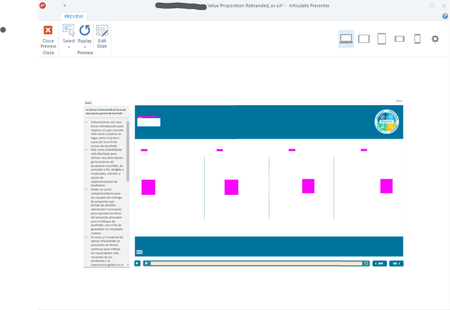
Hi Everyone, I recently started experiencing this issue where I publish using the Articulate tab in PPT, and get the published version looking like this instead of showing the text or images that are on the slides. Has anyone experienced this? I've tried updating, disabling, reinserting content, etc. Thanks! - Jill MartineArticulate Presenter 360 - problems with german umlaut
Hello Forum, we have to rework an older presenter training. The training is in german and as soon as an umlaut is used the text is no longer displayed or becomes very tiny. Does anyone have an idea, or even better, a solution? My presenter version is: v8.33.31612.0 I am using MS Office 360. BR, Roman211Views0likes1Comment