Forum Discussion

Language of Parts
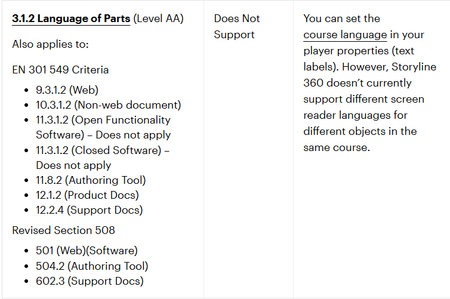

A bit of an old post, but in case anybody needs this functionality, I have written a JavaScript function that will add the required language attributes to the accessible text in the shadow dom.
In order to use this, you need to define a Storyline text variable called: langofparts
Then on the Master Slide add a trigger that resets the variable to "" (blank) on Timeline start. This is to stop the JavaScript running when it doesn't need to:
Then add the following JavaScript to the Master Slide, timeline starts trigger. This defines a function "window.processLangOfParts()" that can be called from any slide:
/* REBUS MEDIA add language of parts */
if(window.processLangOfParts) return;
window.processLangOfParts = function() {
    var langofparts = getVar("langofparts");
    if (langofparts !== "") {
        langofparts = JSON.parse(langofparts);
    }else{
        return;
    }
    /**
     * Wraps each occurrence of phrase in container with <span lang="langCode">...</span>.
     * Only touches text nodes; does not replace entire innerHTML.
    */
    wrapPhraseInTextNodes = function(container, phrase, langCode) {
        if (!phrase) return;

        const walker = document.createTreeWalker(container, NodeFilter.SHOW_TEXT, {
            acceptNode(node) {
                const p = node.parentElement;
                if (!p || p.closest("script, style")) return NodeFilter.FILTER_REJECT;
                return NodeFilter.FILTER_ACCEPT;
            },
        });

        const textNodes = [];
        let n;
        while ((n = walker.nextNode())) {
            if (n.textContent.includes(phrase)) textNodes.push(n);
        }

        for (const textNode of textNodes) {
            const full = textNode.textContent;
            if (!full.includes(phrase)) continue;

            const parent = textNode.parentNode;
            const fragment = document.createDocumentFragment();
            let start = 0;
            let idx = full.indexOf(phrase, start);

            while (idx !== -1) {
                if (idx > start) {
                    fragment.appendChild(document.createTextNode(full.slice(start, idx)));
                }
                const span = document.createElement("span");
                span.setAttribute("lang", langCode);
                span.textContent = phrase;
                fragment.appendChild(span);
                start = idx + phrase.length;
                idx = full.indexOf(phrase, start);
            }
            if (start < full.length) {
                fragment.appendChild(document.createTextNode(full.slice(start)));
            }
            parent.replaceChild(fragment, textNode);
        }
    }
    //
    const shadowdom = document.querySelectorAll(".acc-shadow-dom");
    for (const el of shadowdom) {
        for (const lang of langofparts) {
            for (const key in lang) {
                wrapPhraseInTextNodes(el, lang[key], key);
            }
        }
    }
}
You then define the value of langofparts variable on a slide that contains text that you need to add language attributes to. The contents of the variable have a very specific format that must be followed for it to be processed:
The string must always open and close with square brackets []. Each string of text you would like processed, needs to be defined inside curly braces {}. The correct lang attribute value must be provided. The lang value and string of text must be wrapped in double quotes:
[{"fr":"s'il-vous-plait"}]
If you define more than one piece of text, format in the same way, but separate using a comma:
[{"fr":"s'il-vous-plait"} , {"fr":"je ne sais quoi"}]
The variable should be updated on timeline start of the target slide, BEFORE executing the following JavaScript, on timeline start, to process the slide text:
window.processLangOfParts();Attached is an example implementation.
FYI: You could also define langofparts value in the master slide (not on a slide-by-slide basis), and just execute the window.processLangOfParts() in the master slide. I think it is more efficient to only do it when necessary though.