Forum Discussion

Actions based on opening Resources?

Hi, I've created a Storyline file:
I uploaded a file to the Player resources
I created a button with the following action:
"Open story_content/external_files/INT-DIRECT.pdf"
Results:
When clicking the Resources link or the Button, same outcome in Chrome (current version):
1- it opens the PDF in a new tab
2- I cannot access the module anymore.
info: Workday Learning LMS

Hi PierreA-34400,
I'm happy to help!
I have a few clarifying questions to help me better understand what's happening.
- When you say you can't access the module anymore, what do you see?
- Does the issue persist in a different browser?
- If you upload the course to SCORM Cloud, does it behave the same way?
If it works as expected in SCORM Cloud, the issue may be related to your LMS. If it persists, we'd be happy to take a closer look at your .Story file and PDF here or privately in a support case!
- PierreA-3440015 hours agoCommunity Member
Hi Kelly,
thanks for your support :)
I have uploaded the Scorm file in our LMS (Workday learning), and viewing the course in the latest Chrome browser.
When I click the PDF button, it rightfully opens the PDF, in a new tab, but the previous tab has a popup blocker message (popup blocker is disabled on the URL) and if I refresh the tab, it offers to either restart the course or continue (to the same page, prior to PDF opening).
Is there a way to not open the PDF but download it please?- EricSantos3 hours agoStaff
Hi @PierreA-34400,
Thanks for the details, and I appreciate you taking the time to explain how the PDF behaves in Workday Learning with the latest Chrome. It sounds like you’d like learners to get the PDF without losing their place in the course.
At the moment, Storyline can’t make a PDF download instead of opening. The Open URL/file trigger hands the file to the browser, and the browser decides whether to open it in a tab or a window, or to download it.
Two things may help with what you’re seeing.
First, you can try opening the PDF in its own window instead of a tab. In the trigger, hover over the file path and click the gear icon to choose to display it in a new browser window and set a custom window size. I’ve included a screenshot that shows where to find these options. In Chrome, that should open the file in a separate window, which keeps the course tab apart. I can’t promise it will stop the popup message in Workday, but it’s worth testing.
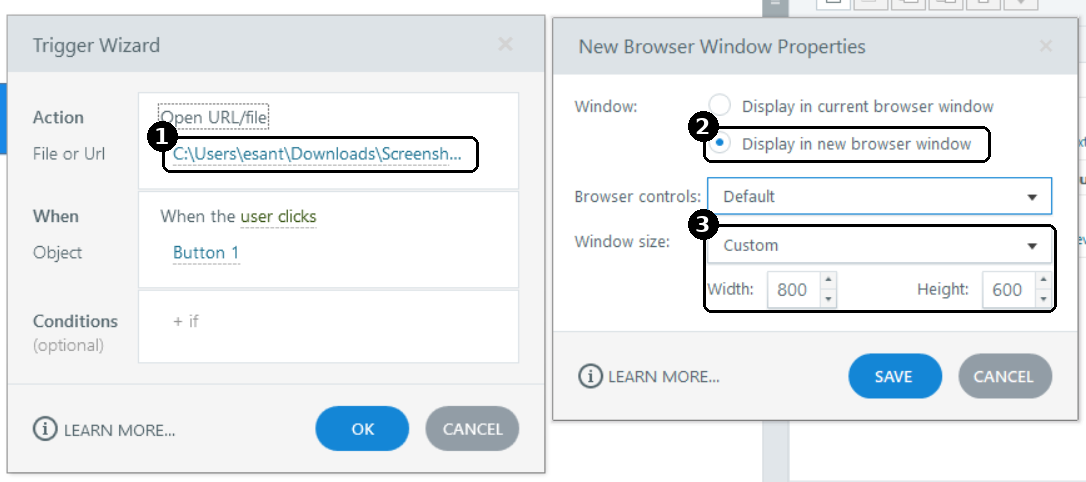
Second, the restart or continue prompt you see after refreshing comes from the course’s resume setting, which asks learners whether to pick up where they left off. You can change it under Home, Player, Other, then Resume, and choose Always resume or Never resume.
Kelly asked earlier whether the course behaves the same way in SCORM Cloud. If you get a chance to test it there, what do you see?

Related Content
- 10 years ago
- 1 year ago