Forum Discussion

Are fonts embedded?

Hi Julia!
Have you tried turning on Modern Text and republishing the file? I wonder if you'll see a difference using that feature.
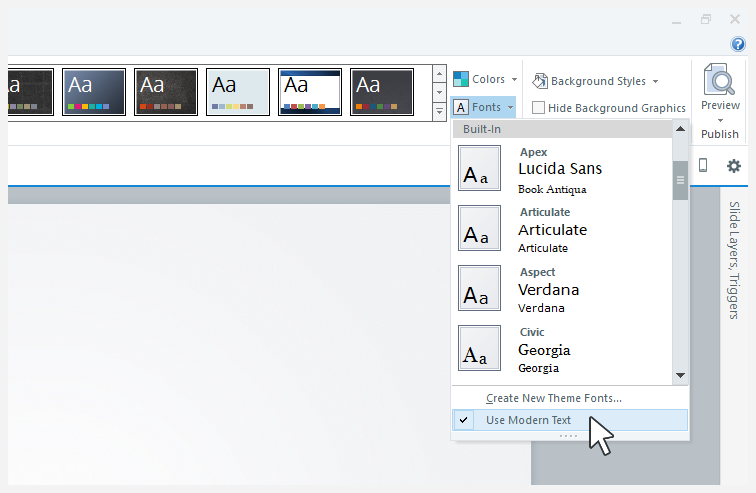
Go to the Design tab on the Storyline ribbon, click the Fonts drop-down list, and select Use Modern Text at the bottom of the list. This feature converts the entire project to modern text all at once.
- ShawnMcCulley-b7 years agoCommunity Member
Has any solution been found for this issue? We have a client that still uses IE 11 and when they view the prototype of the course we are developing for them, the fonts are being substituted. I was initially using Lato, but switched to Open Sans to see if that would help. It didn't. (See the attached files). Additionally, the f and sometimes the i are missing. We are exporting to HTML 5 only. We can't expect a large state agency to change or update their systems for one course and they shouldn't have to. Can CSS be used to reference a Web font placed in an external folder similar to what Lectora can do? Any help would be much appreciated.
Thanks.
-Shawn
- Crystal-Horn7 years agoStaff
Hi there, Shawn. We've prioritized the fix on the authoring side so that course viewers, or their administrators, won't have to make adjustments to the browser settings. We're still finalizing the details of the solution after getting some feedback from users. We're making progress, and I hope to be able to share some good news with you as soon as I can!
- JerryMcCorkle-67 years agoCommunity Member
This was a priority two months ago, but today (December 11, 2018) I had a user unable to see the t's or f's in a course using Lato font, with Modern fonts enabled and in straight HTML5 output published to Articulate 360. Is this likely to be fixed soon? I am running the most current build of Storyline360. (v3.22.17236.0)





Related Content
- 1 month ago
- 1 year ago