Forum Discussion

Articulate 360 Open Forum: Ask Your Questions

Hi - WIth the new Articulate 360 AI - Is there a new way to Magic Lesson Import? It used to be where the AI assistant wat in the top right corner and all instructions lead to the old way. DO we have guidance on a new way?
- EricSantos2 days agoStaff
Hi Coombesp,
Welcome to the community, and thanks for asking. It sounds like you’d like to find Magic Lesson Import now that the AI Assistant menu has moved. You’re right that the instructions you’re finding describe the old setup, and the AI Assistant menu in the top right was retired in September.
Here’s where to find it now, and I’ve included a screenshot that shows the menu.
- Open your course to the course overview page, where your lessons are listed.
- Click Add Content.
- Select Lesson, then choose Magic import.
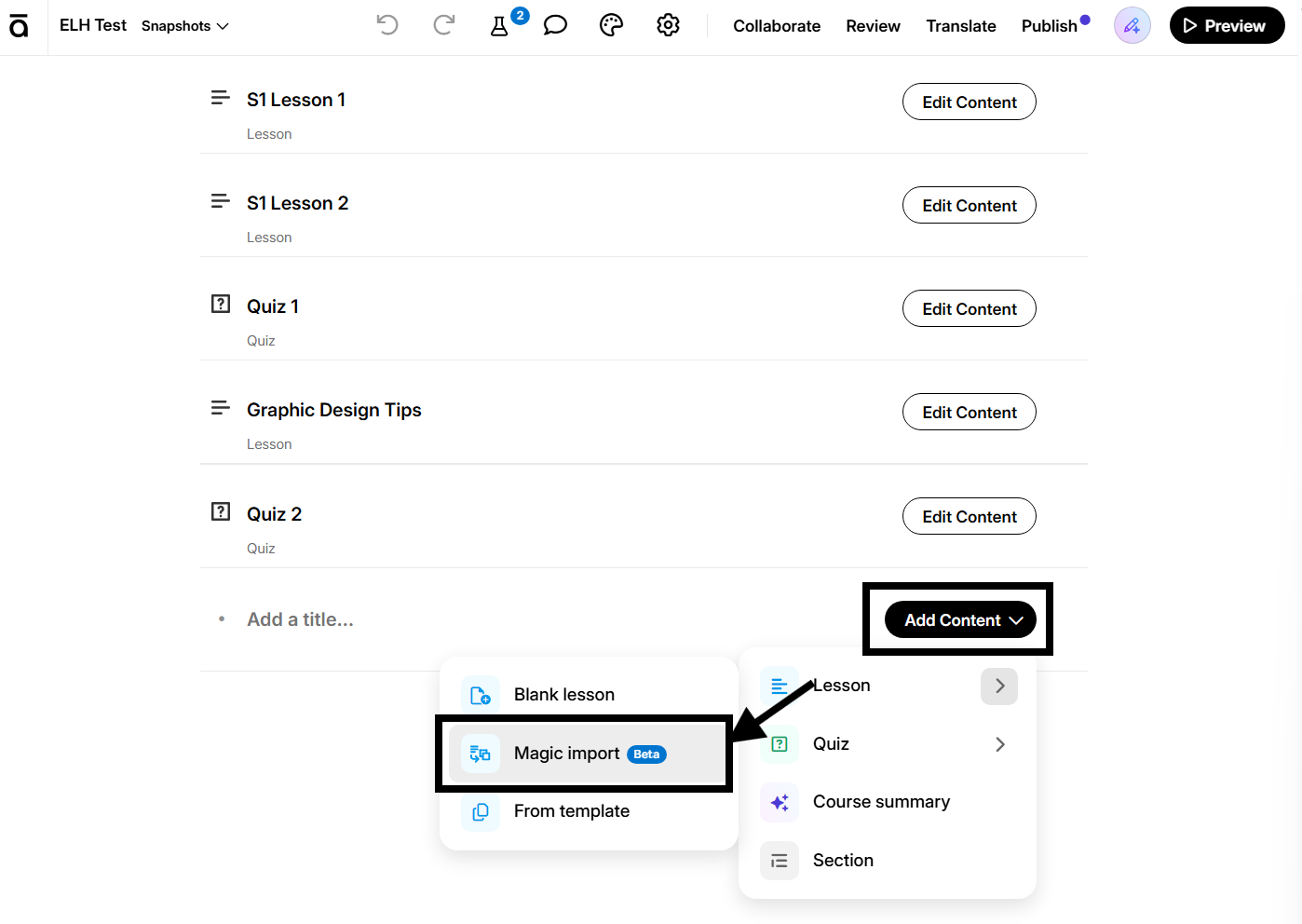
In the menu it’s shortened to “Magic import,” and it’s still marked Beta. Once you’ve opened it, the tips for preparing your document in our Magic Lesson Import article still apply.
Let us know if there’s anything else we can help with.
- Coombesp1 day agoCommunity Member
That's worked. Thank you for the response.
- EricSantos1 day agoStaff
You’re welcome, Coombesp, and I’m glad that worked!

Related Content
- 1 month ago