Forum Discussion

Bullet points are different sizes across flash cards
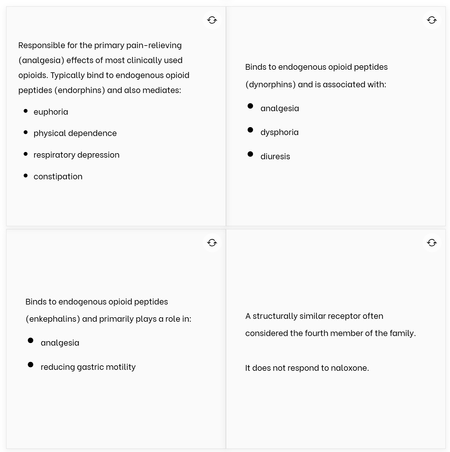
Hi,
Phil, thanks for the reply.
I work at a university, and the content needs to be accessible. Workarounds like this break accessibility. By manually adding bullets the underlying code is no longer structured as a list.
Using the bullets function, we get structured HTML that is accessible:
By manually typing bullets, we get HTML that is incorrectly structured as paragraphs:
Other places where I run into formatting problems are in titles and some activities (the matching one for sure). I work on a lot of technical content. Sometimes I need text to be subscript, or superscript, or italic, and the option isn’t there. A commonly used workaround that was shared with me is to search for “italic text generator” online and use that to make italic text (or superscript/subscript). This gives Unicode italic text that you can copy-paste into your course. Besides the visual inconsistency, my screen reader (NVDA) does not read these Unicode characters correctly.
Example 1 – Labeled graphic:
Example 2 – Lesson titles:
Example 3 – Matching exercises:
The only place that I have found a workaround is for accordion titles. In the text I can add <i></i>, <sup></sup>, or <sub></sub> tags to style the text as needed.
For example, in the editor:
In the final course, it works:
I've tried this technique in other Rise blocks, but unfortunately it doesn't work there.

Madelayne sorry I totally neglected accessibility. The only other thing I can recommend is adding a CSS theme component to your exported courses. The css would would like this to force a font size of 16px on the flipped card text and bullets.
li.flashcard .flashcard-side__description {
  font-size: 1.6rem;
}
Related Content
- 4 months ago
- 6 months ago