Forum Discussion

Can I specify Voice for auto gen localized audio? (Storyline release 12/2/2025)
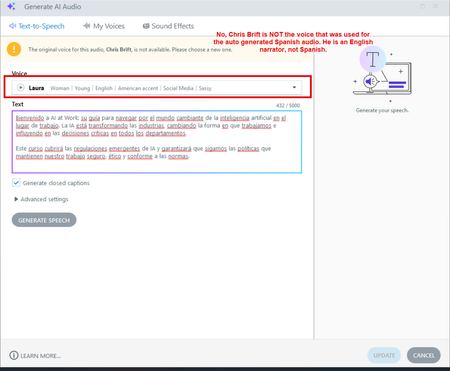

I can confirm I am experiencing this exact same behavior with the new Localization feature today.
In my testing (English to Italian), the AI successfully translated the text script inside the Text-to-Speech editor, but it did not automatically regenerate the audio file on the timeline. The audio remained in English until I manually opened the Text-to-Speech editor for that specific slide and clicked the blue 'Update' button.
Having to manually click 'Update' on every single slide negates the time-saving benefit of the AI feature. It would be great if this issue could be fixed in an updated version. Alternatively, could you suggest a better workflow to save time on this step?
- StevenBenassi6 months agoStaff
Hi esarticulateai1!
Thanks for sharing your experience when translating Text-to-Speech with Storyline Localization!
I see that you've also opened a support case being handled by my teammate, Robert. It looks like he just replied to your e-mail with insight and follow-up questions.
You're in great hands working with him, and we can continue the conversation through your case!
