Forum Discussion

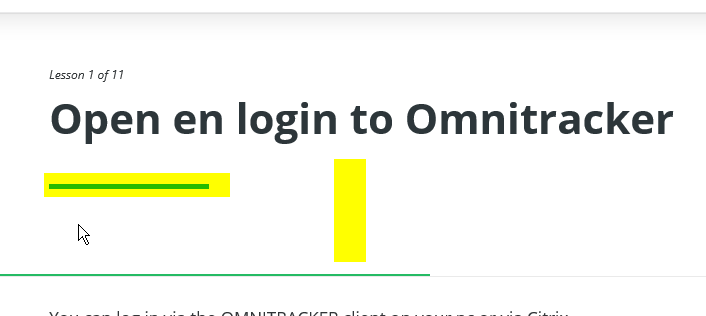
Change header of Rise course
Best,
I am new to Rise,
When making my first course I have the following questions,
- Can I adjust the main part of the course? (Screenshot1) Here I would like to adjust the space and possibly remove the green line
- When adding an interactive proces I would like to remove the heading (Screenshot2)
Who can help me,
Thx
Patrick
6 Replies
Hi Patrick,
Thanks for posting your question here in the community.
Unfortunately, you're not currently able to edit those design elements in Rise.
We’d love to hear more about how having this ability would improve your experience using Rise if you’re up for logging a feature request.
Please reach out if you have any more questions!
- ChrisRoetzer-46Community Member
Hi - any update here? New to Rise and thought I heard teammates editing header unless it was these other basic design elements, TY...
Hi Chris! The lesson headers in Rise 360 aren't customizable right now. Thanks for letting us know you'd like to have that option!
- LeahGanglCommunity Member
How about now?
- IDEASArticulateCommunity Member
All I see in these forums are "please submit a feature request" or "good to know that you'd like this option". So far, I haven't seen a single requested feature be released.
- KarlMullerCommunity Member
Hi IDEAS Articulate Guest account 2,
Actually, you have several options for using Lessons Headers:
You can completely turn off Lesson Headers: https://community.articulate.com/discussions/rise-360/new-in-rise-360-lesson-header-toggle
And if you want to use Lesson Headers, there are three size options:
- Small
- Medium
- Large
There are also several options regarding style and color, and you can also choose an image as a background.
I recommend that you open any Course, select THEME, and then choose Lesson Header and try out all of these options.







Related Content
- 9 months ago
- 1 year ago