Forum Discussion

Collapsible menu in Rise?
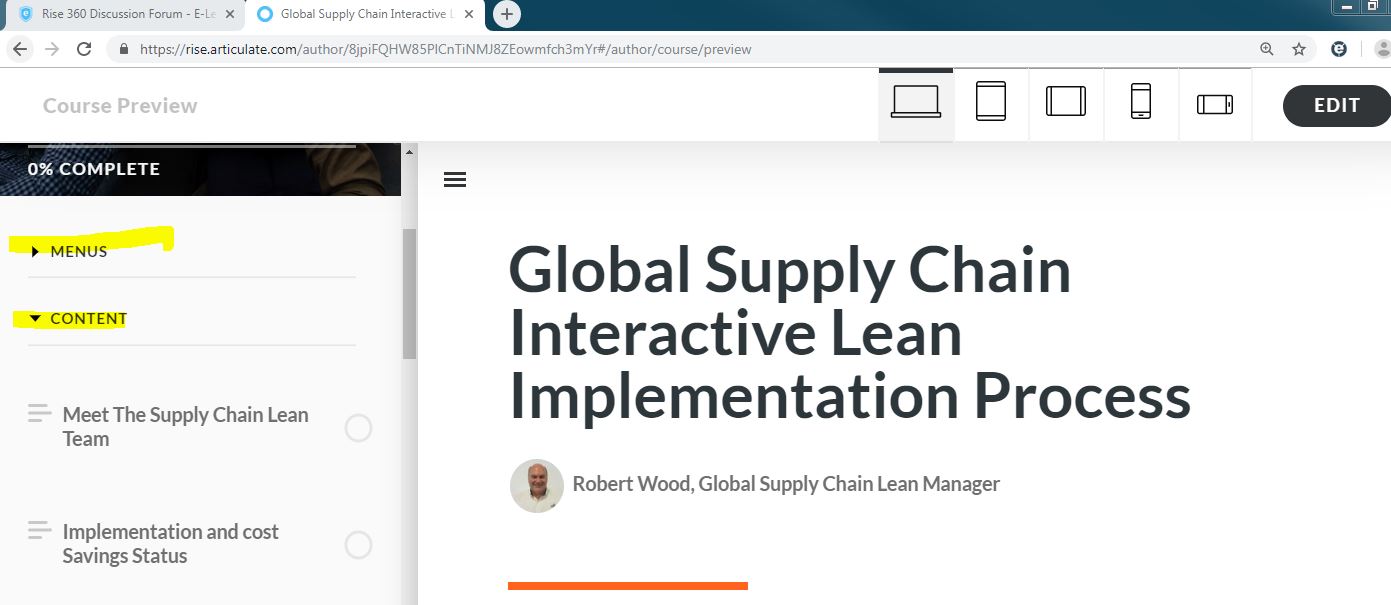
I love the feature of the side menu for the learner to navigate quickly. However, in one of my courses there are a lot of places to go resulting in the menu being cumbersome. Is there a way to default to have the menu collapsed as shown in the attached file?
Hello everyone,
I'm happy to let you know we released a new update for Rise 360! This update adds the following feature:
- Automatically collapse sections in sidebar and compact navigation.
There's nothing to install for web apps. New features and fixes are immediately available, though you might need to publish your Rise 360 course again.
Let me know if you have any questions about this update.

55 Replies
- SharonGanCommunity Member
Needing the option to set default of enabled navigation to collapsed as well.
- SarahBauerCommunity Member
Please add this feature, it will help with a clean, easier to navigate experience
Hi Sarah!
Thanks for the feedback!
I've included you in the feature report and will update this discussion if it makes it onto our Feature Roadmap.
Have a great rest of your week!
- AngeCommunity Member
I would like it too.Thank you.
- JayChun-a9a7f57Community Member
Please have this option.
- JasminaTisovic-Community Member
Need this function too
- MarkWCommunity Member
+1
- JeannineRaymondCommunity Member
Needing this feature too - we've heard back from many neurodivergent learners who find the open menu not accessible - a collapsed menu would be more accessible to all learners who participate.
- DeniseSchillingCommunity Member
I need this feature, please
- benoitBOUDINCommunity Member
+1 : this feature is something really needed, and is expected to enhance the Rise experience.
- DelphineAderCommunity Member
I also think that it's really important to present the course with a collapsed menu.
Thanks to add this feature.











Related Content
- 5 months ago
- 3 months ago