Forum Discussion

Correct layer not displaying based on button states
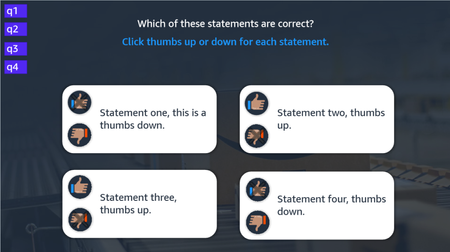
Thanks for the analysis and test project. I think this helps clear up the issue. The buttons change to their correct/incorrect states to indicate to the learner what was the outcome. This happens when they click either button.
Your variable solution sounds like it will work. I will give that a try.
Side note: Both feedback layers should only display after all questions have been answered. 4 correct shows the "Correct" layer and 1 or more incorrect shows the "Incorrect" layer.
Thanks!
- AndrewBlemings-5 hours agoCommunity Member
Happy to help. In thinking through this a bit more, I wonder if a simpler method might be to introduce a numeric counter?
Each of the incorrect buttons could have a trigger that adds one to a number variable called wrongAnswers or something. Note, not set it to 1, but add 1. A perfect score would obviously mean someone ended the slide with wrongAnswers still at its default of 0. Someone who got every statement/question wrong would end with wrongAnswers equal to 4.
To avoid learners increasing the counter by clicking an already-incorrect oval, I would duplicate the Incorrect state out to the built-in Disabled state.
And then update the triggers to show the Disabled states instead of the Incorrect:
That Disabled state will block all future learner interaction, ensuring one "wrongAnswer" per click.
A trigger can show the incorrect feedback layer when all of the rectangle-markers in the upper-left have changed to Visited like you had, but just add the conditional "if wrongAnswers > 0".
If wrongAnswers is zero, processing will "fall through" to the second trigger that shows the Correct Feedback layer.

Related Content
- 5 months ago
- 5 months ago