Forum Discussion

Custom Hover State not Working as Expected
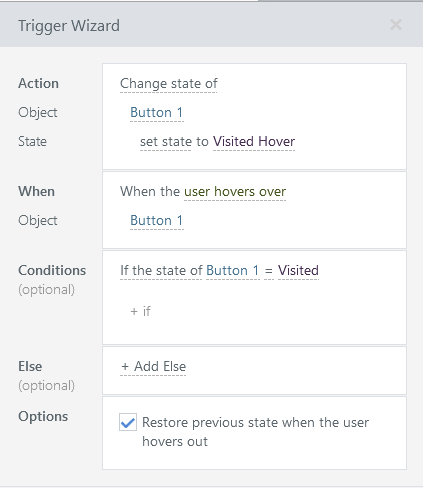
Thanks Ron. Removing the trigger actually kind of works and it seems like Storyline is honoring the "Visited Hover" state. However, after a bit of investigating, I see that the "Visited Hover" is not getting applied. The standard "Hover" state is being applied over the "Visited" state which has the check mark, so it appears that "Visited Hover" also has the check mark.
If I move the check mark on "Visited Hover" from the left to the right side of the button, I can see that the check mark stays on the left when I hover, proving that "Visited Hover" is not being applied.
Adding the trigger back behaves as I describe previously. I've attached my bare bones story file.

Hi GotG!
Glad to see Ron has been helping you. Happy to jump in!
The design you were looking to implement can be accomplished in a simpler way, without the use of additional custom States, or Triggers. In the .story file I've attached, I added a Button with a Checkmark only on the Visited State (Red). This icon appears once the Button has been clicked (visited), and remains when the learner hovers over the Button as well.
The issue you were facing was due to having two hover events occur simultaneously. The built-in hover event did not disable, which is why it was conflicting with the second (custom) hover event.
Please let me know if this works for you!
- GotG1 year agoCommunity Member
Thanks for the explanation Steven. This works for a simple design, but what if I need a truly unique "Visited Hover" state that isn't just a combination of the built-in Hover and Visited states? Can I disable the built-in Hover state with a trigger after the button is visited for the first time?
- JoseTansengco1 year agoStaff
Hello GotG,
Glad to hear Steven was able to help you out!
The built-in hover state will always appear when the mouse hovers over the linked object. This is why having a second "Visited Hover" state won't be suitable for the design; the hover state will always have priority. There isn't a way to disable the hover state with a trigger, so you'll need to plan accordingly if you intend to use hover interactions for your objects. Our best design recommendation would be to use only one hover interaction per object—either the built-in hover or a custom hover interaction, but not both.

Related Content
- 10 months ago
- 6 months ago
- 10 months ago