Forum Discussion

Customize Default Color Grid?
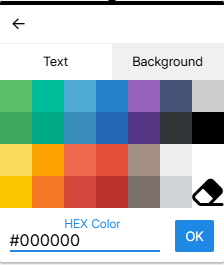
I was on David's webinar today and asked about Theme colors but I also wondered if we are able to customize/change out the default colors in the grid. For example, I change the text font color to reflect internal brand colors and each time I change a word I have to add in the HEX code instead of just clicking on one of the provided colors. Is there any way to change those provided colors? I hope I am making sense.
Unfortunately, at this time, there's no way to customize the color palette in Rise 360. So, yeah, you should keep the HEX code handy.
Another option: set up a text block with the brand color and any other formatting you prefer. Save it as a Block Template. The next time you need branded text, insert that Block Template. Here's more info: https://www.articulatesupport.com/article/Rise-Creating-Sharing-and-Reusing-Block-Templates
P.S. Always check the tag before you publish a new discussion. This question is about Rise, yet the post is tagged as Storyline:

5 Replies
- JudyNolletLegend
Unfortunately, at this time, there's no way to customize the color palette in Rise 360. So, yeah, you should keep the HEX code handy.
Another option: set up a text block with the brand color and any other formatting you prefer. Save it as a Block Template. The next time you need branded text, insert that Block Template. Here's more info: https://www.articulatesupport.com/article/Rise-Creating-Sharing-and-Reusing-Block-Templates
P.S. Always check the tag before you publish a new discussion. This question is about Rise, yet the post is tagged as Storyline:
Hi Sheri_Matt!
Glad to see Judy has been helping you!
As she shared, Custom Color Palettes are not currently supported by Rise 360. However, we are tracking a feature request to introduce this enhancement. I've included your voice in the report!
We'll be sure to notify you if this feature makes it to our product roadmap.
- TonyThomas-c64cCommunity Member
I believe this should be treated as a priority rather than a "we'll look into it" enhancement.
Articulate has already reduced efficiency by removing the default colour palette from Rise 360. At the same time, many users have been requesting the ability to create and save custom colour palettes based on corporate branding or preferred colour schemes. Instead of improving the workflow, the current changes have made it slower and more cumbersome to apply consistent colours throughout a course.
Restoring the default colour palette and introducing user-defined custom palettes would significantly improve both usability and productivity for course developers.
That is of course if you are interested in helping your customers who pay a significant amount each year to use your product.Hi TonyThomas-c64c,
Thanks for taking the time to explain this. I can understand why this disrupts your workflow, particularly when you're frequently working with the same colors.
I wanted to introduce you to Brands in Rise 360, which may help with some of what you’re trying to accomplish. Brands let you create and save reusable sets of brand elements, including colors, fonts, logos, and other styling. There's also the option make a brand the default across newly created courses. This can be especially helpful if you regularly create courses that need to follow the same corporate branding.
That said, I recognize that using Brands may not fully address what you're looking for, particularly if your need is to have a custom palette of colors readily available while working with individual elements in your course. If you are interested in testing out the Brands feature, I'd love to learn if it helps with any part of your workflow. If not, I’d love to better understand what’s still missing.
Any additional detail about how you’d ideally like this to work would be helpful in making sure we’re accurately capturing your feedback!
- TonyThomas-c64cCommunity Member
Hi Kelly
Thank you for your response.
I apologise for not replying earlier as I have just returned to work after a 4-week break.
I am indeed interested in testing out the Brand feature in Rise 360 and will provide applicable feedback after having a good look at it.
Thanks again,
Tony Thomas



Related Content
- 7 months ago