Forum Discussion

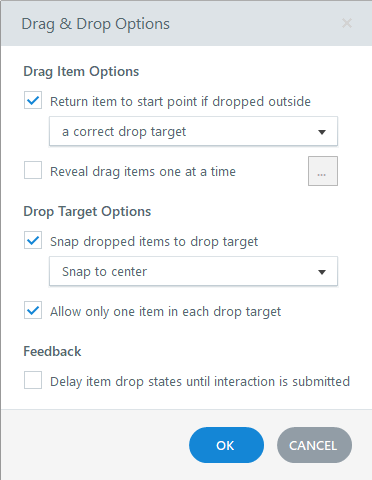
Drag-Items do not return to start point when dropped outside correct target
- 6 months ago
Thanks so much! I've explored a bit more with your project file and have come to the conclusion the problem is the draggable options. I'm unsure why, but the code for the draggable objects is very different in the inspector between the two slides.
On a hunch, I deleted one of the draggables from the first slide and made a new rectangle/option, hooked it up in the Form View, and can confirm that one returns to its origin after I release the mouse button. It seems the individual draggable objects are the culprits. I hope this works enough to keep you from creating a whole new project. Let me know if it works!

Are you able to share a project file?
- Katrin_M6 months agoCommunity Member
Hi Andrew,
thanks for your response!
I uploaded the project here.https://360.articulate.com/review/content/091d651a-3637-4ec9-ba94-1828c0b32404/review
The second slide does exactly what I expect, the first does not.
Thanks for watching!
Katrin
- AndrewBlemings-6 months agoCommunity Member
Apologies, I can see the difference in functionality from the Review link but am unable to troubleshoot the actual triggers and settings without the project's .story file.
- Katrin_M6 months agoCommunity Member
Sorry!
See attached.