Forum Discussion

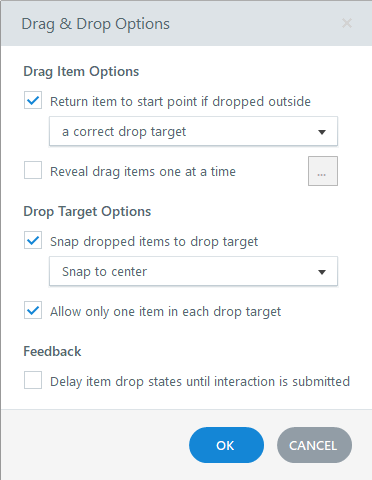
Drag-Items do not return to start point when dropped outside correct target
- 6 months ago
Thanks so much! I've explored a bit more with your project file and have come to the conclusion the problem is the draggable options. I'm unsure why, but the code for the draggable objects is very different in the inspector between the two slides.
On a hunch, I deleted one of the draggables from the first slide and made a new rectangle/option, hooked it up in the Form View, and can confirm that one returns to its origin after I release the mouse button. It seems the individual draggable objects are the culprits. I hope this works enough to keep you from creating a whole new project. Let me know if it works!


Hello,
I'm experiencing the same mistake as Xiaoshuang_W. Is it really just about corrupt/faulty shapes? We have a lot of these tasks in some courses, and until recently they have worked with a publication from <version: 3.104.35448.0>. Now we had to update some things and the mistake occurs.
I would be very grateful for an answer from the staff.
Thanks in advance & best regards
- EricSantos4 months agoStaff
Hi MartinHornstein,
Thanks for reaching out and sharing that additional context.
Based on your description, it sounds like you're experiencing the same behavior that Xiaoshuang_W reported. This issue is related to a bug we're currently tracking where drag objects do not return to their starting position when dropped outside the correct target if a trigger to show a layer is attached to the drag object.
I've added your voice to the bug report so our team can continue to track the impact. We'll be sure to share any updates in this thread as soon as we have news to pass along.
Thanks for taking the time to let us know you're seeing this as well.
