Forum Discussion

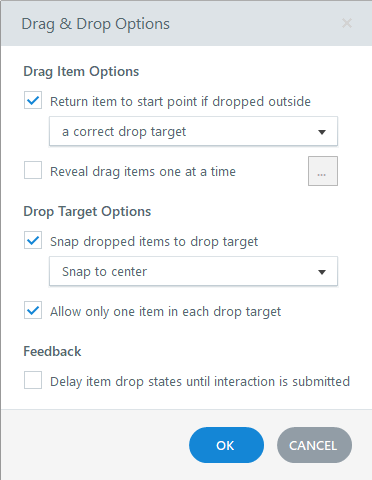
Drag-Items do not return to start point when dropped outside correct target
- 6 months ago
Thanks so much! I've explored a bit more with your project file and have come to the conclusion the problem is the draggable options. I'm unsure why, but the code for the draggable objects is very different in the inspector between the two slides.
On a hunch, I deleted one of the draggables from the first slide and made a new rectangle/option, hooked it up in the Form View, and can confirm that one returns to its origin after I release the mouse button. It seems the individual draggable objects are the culprits. I hope this works enough to keep you from creating a whole new project. Let me know if it works!


Hi, I had the same problem, it worked when I first built the interaction, but later on wouldn't work. I found it was because I had an SL corrupt asset message previously. When I deleted and recreated the drag items from scratch it worked perfectly.
- StevenBenassi1 month agoStaff
Hey BrianGrindley,
Thanks for sharing how you resolved file corruption in your Storyline build.
I noticed that you've also opened a support case, being handled by my teammate Christian. I've just updated your case with the feedback you've shared, so Christian can be kept in the loop.
Have a great rest of your week!
