Forum Discussion

Easy (Hopefully) Trigger Issue
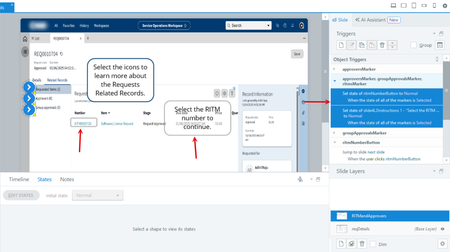

An object with Normal and Selected states toggles between those states when clicked. That means someone could deselect an item, and the three would never be in the Selected state at the same time.
The other possibility is if the items are in a button set. That would automatically deselect the other items when one is clicked.
I suggest you use the Visited state instead. Each object will automatically change to that when clicked. And it will stay Visited (unless a trigger changes it, or the user returns the slide and it Resets to Initial State).
Here's more info about the built-in states: PRIMER: Take advantage of built-in states | Articulate - Community
Unfortunately, using the Visited state, did not work. I deleted the original trigger first and that didn't work then I made Visited states since I didn't see them for the markers under states. I understand their automatic, but it didn't work when I deleted the trigger.
- JoseTansengco1 year agoStaff
Hi CraigChavez,
Happy to help!
It would be helpful if you could share a copy of your Storyline 360 project file with the community so we can check how your slide is configured and add any missing triggers or edit existing ones if necessary. Feel free to open a case with our support team here if you prefer to share your course privately. Our support team will delete it afterwards after we're done testing!
- CraigChavez1 year agoCommunity Member
Sounds good. Just submitted a case. Thank you!
- LucianaPiazza1 year agoStaff
Hi CraigChavez,
Great call opening a support case! I see that you're working with my colleague Luiza. You're in excellent hands!
We'll continue the conversation over in your case.
Have a great start to your week!


Related Content
- 2 months ago
- 1 month ago
- 7 months ago