Forum Discussion

Embedded Video Trigger

Hi Michael,
I just had this same question and found this page. I ended up figuring this out by doing the following:
In StoryLine:
1. Remove Next button from the slide
2. Create a Text variable with any name. e.g. VideoFinishedEvent
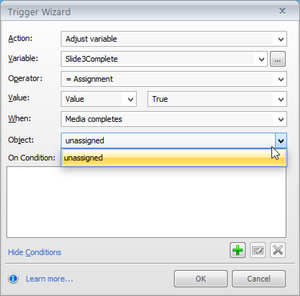
3. Create a trigger to advance to next slide when the variable changes:
In your video player:
In the equivalent of the video completion event for you video player, add the following JavaScript:
var d = new Date();
var player = parent.parent.GetPlayer(); player.SetVar('VideoFinishedEvent', d.getTime());
Here's what's going on;
Line 1: Creating a date object for use on Line 3
Line 2: Getting a reference to the StoryLine html player
Line 3: Changing the variable VideoFinishedEvent to the current time in milliseconds
I'm setting the variable to a value that should always be different from any previous value saved. This is done to ensure the value is always different, thus triggering the variable change trigger.
I'm sure there is a better way to do Line 2, but I haven't gotten that far yet.
Good luck!

Hi Toby,
Thanks for your guidance! Your solution is really neat and it's given me some ideas as to how to control video playback for our module.
I'm wondering if there's a way to manipulate the javascript code you provided. Can I set my 'VideoFinishedEvent' variable to FALSE by default, and then have the javascript execute to change the variable to TRUE when the vimeo video timeline reaches the end?? If that's possible, I can then link my next button to appear when the variable equals true! Any insight or help would be greatly appreciated!
Thank you!!
Related Content
- 11 months ago
- 10 months ago
- 12 months ago