Forum Discussion

Error: Media Playback error in RISE file published to LMS.

This sounds very similar to an issue that we've experienced using PeopleFluent / NetD LMS.
We uploaded a video directly into the course, blocked users from skipping through the video, and blocked the "continue" button until the video was completed. I exported as Scorm 2004 v4 (although I tried others to troubleshoot also).
Troubleshooting:
- Cleared browser cache
- Updated Chrome from v. 114.0.5735.110 to v. 114.0.5735.134
- Re-published the course in the same format and other formats
- Attempted the course in incognito window
- Watched the video within Rise360, no error
- Attempted the course in Firefox. Lost audio and the video froze but I was able to resume playback.
- Unable to test on SCORM Cloud due to file size
- Reviewed and even republished the original video file
- Enabled de-bug mode
- Created a brand new course with a different recording; same error
Some other observations:
- SCORM file is 253 MB
- The video freezes at different times for different users but is usually around the same time each time.
- Multiple users reported this issue; Edge, Chrome and Firefox all experience an issue; users were located in different locations with different internet connection speeds; some were at the office with high speed.
We have hosted the video on Youtube and allowed users to skip forward in order to work around the issue for now; however this is not ideal as users can ignore the video completely and skip forward in the course.
The video is a mp4 file and is an hour-long recording. I'm wondering if although RISE does not indicate a maximum file size, and the video does upload, the 250-300 mb video file could be slightly corrupting on upload or publication. (Although, some users can relaunch the course in incognito mode and finish the course after several attempts.)
- hazelB2 years agoStaff
Hi Talent Development! So sorry to hear that you're encountering an issue with a video in your Rise course. Does this happen to all your videos or just this one?
I would suggest encoding the file in Handbrake, and then try uploading to Rise again. Here are some instructions:
- Download, install, and open the HandBrake app.
- Drop your video file on the HandBrake app. Or, click Open Source on the ribbon and import your video file.
- In the summary settings, mark the Web Optimized box, as shown below. You can leave all the other settings as they are.
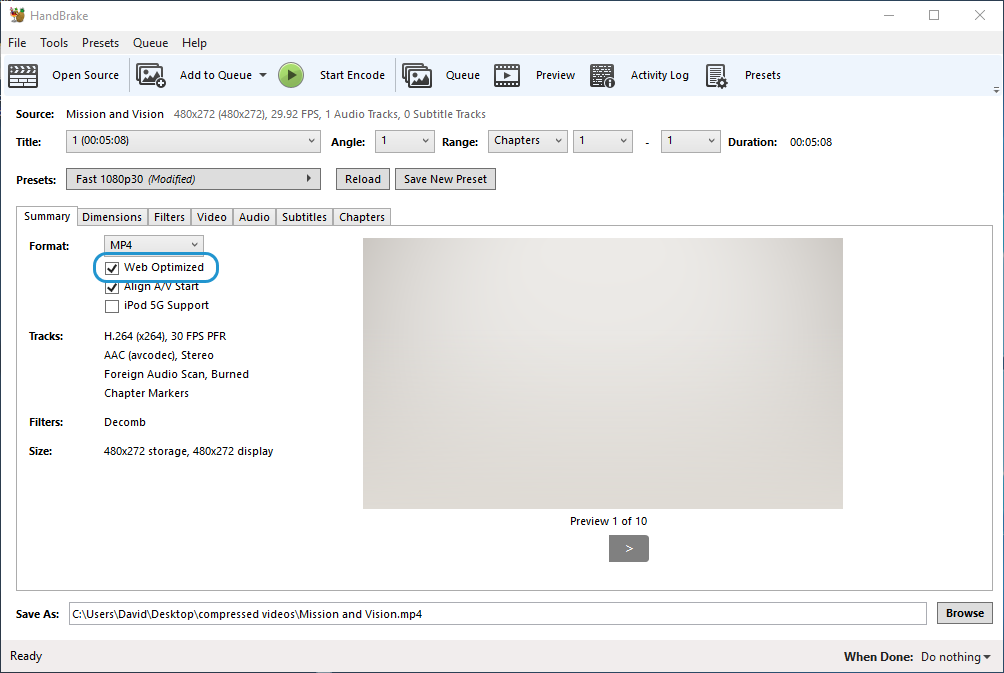
- Click Start Encode on the ribbon to re-encode your video.
Insert the new video file into your e-learning project and republish the course.
Let me know if this worked for you! If not, you can always open a case here.


Related Content
- 3 months ago
- 8 months ago