Forum Discussion

Error when uploading SL360 content to PeopleSoft
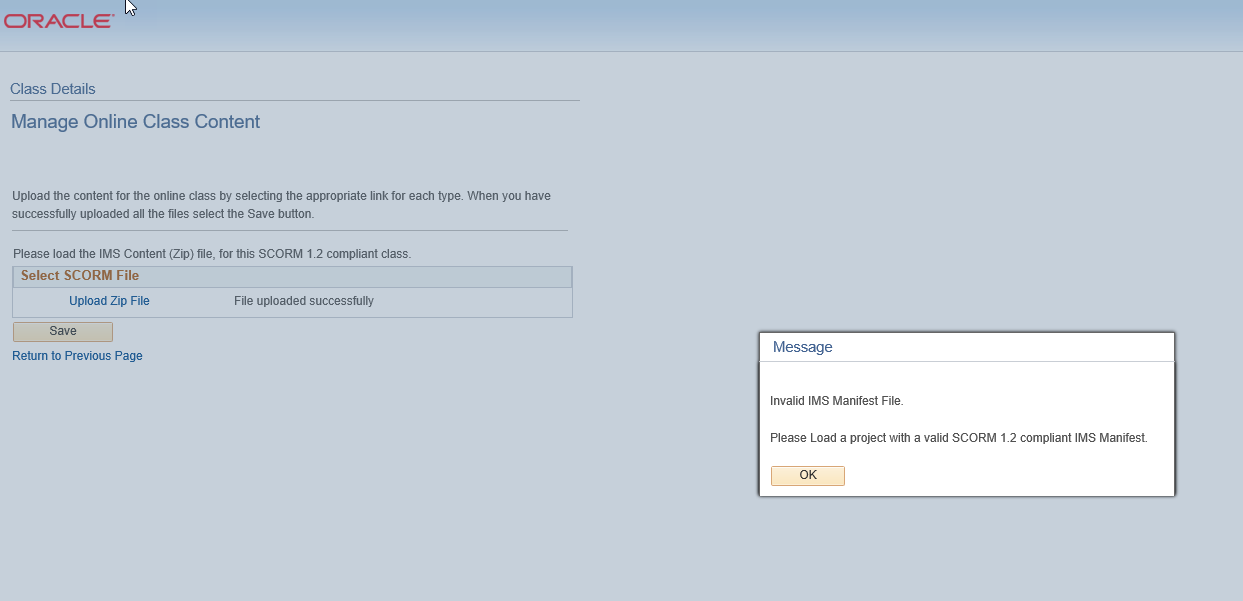
Hi - have a client who uses PeopleSoft LMS. When they try to upload content created/published in SL360, they get an error: Invalid IMS Manifest File. Please load a project with a valid SCORM 1.2 compliant IMS manifest.
I have tested this file in SCORM Cloud and it is SCORM 1.2 compliant. Can anyone give tips on how to upload Storyline content to PeopleSoft?
Thanks, Steve.
28 Replies
- JohnCarter-66e5Community Member
I am having the exact same problem. Has there been any resolution to this issue???
Oh no, John.
Were you able to test in SCORM Cloud as well and it's working as expected?
Hopefully Steve will be able to pop in and share an update if he's made some progress on this.
Otherwise, you may need to reach out to PeopleSoft.
Welcome to E-Learning Heroes by the way!
- SteveJonesCommunity Member
I reached out to support and got this response:
From the looks of your screenshot, it appears you're experiencing this issue when uploading a SCORM 1.2 published file to PeopleSoft Enterprise Learning Management (ELM). Happy to help you get to the bottom of this.
Can you please confirm if the following steps work? What you're experiencing could be related to an existing defect with the following workarounds.
1. Publish the course using SCORM 2004.
2. Downgrade to Storyline 360 Update 11. Follow these steps to install the previous version of your software:
2.1) Open your Articulate 360 desktop app by clicking the icon in your computer’s system tray (by the clock) or using the shortcut on your desktop.
2.2) Hover over Storyline 360, click the drop-down arrow that appears, and choose the uninstall option.
2.3) Download and install the previous version here: http://tinyw.in/ab1L
2.4) To open Storyline 360, go to your computer’s Start menu and select it from your list of apps. Or, create a shortcut for it on your desktop or taskbar. (You won’t be able to open it from your Articulate 360 desktop app. It’ll show an Update button rather than an Open button while this older version is installed.)
My client has told me if SCORM 2004 worked or not so haven't tried the remaining steps yet.
Thanks, Steve for sharing that update here with us.
I know that Update 11 is what works for folks using this LMS, but we'd advise anyone else running into a similar issue to connect with our Support team first so that we can help you confirm it's the same thing. I'd hate for someone to be on a much older update than necessary (we're currently on Update 17).
- RenaTowlesCommunity Member
My company has noticed for a while now this exact same error. We actually started using SCORM 2004 instead of SCORM 1.2 because of this error. Is there any updates on why the newest version of Articulate isn't playing nice with Peoplesoft 9.2?
Hi Rena,
I took a look into the case that Steve worked on with our team and I do not see any additional information shared. We do have this as an open report.
Publishing to SCORM 2004 is also a note we also have listed, so good to know that this is working well for you as well.
You should now be subscribed to this forum thread and we will be sure to share any additional information that we have here with you.
- SteveJonesCommunity Member
I did downgrade my Storyline, republished, and then re-sent the file.
Never heard back from the client if it worked or not.
Thanks, Steve :)
- Kim-BrownCommunity Member
Hi, I'm getting the error trying to publish a Studio 13 (cloud) course. PeopleSoft ELM is complaining about a duplicate tag in ims.manifest.
The oracle peoplesoft error is: A software fix is applied to fix the content upload error due to a duplicate tag “identifierref” in a SCORM1.2 content file.
I'm trying to locate the duplicate tag and see if removing it helps. the bug is Bug 19941996 : ELM 9.2: SCORM 1.2 CONTENT ERROR AFTER UPLOADING THE CONTENT.
Hi there, Kim. Happy to help!
If you see this error when uploading to the PeopleSoft LMS, let's check out how the same course behaves in SCORM Cloud (a free industry-standard tool for testing SCORM output). I'm also curious to know if publishing to the SCORM 2004 format helps resolve this error.
And if you're able to share the source file here, we'd love to test it and share our findings with you. Keep us posted either way!
- Kim-BrownCommunity Member
Thanks for the reply! SCORM Cloud finds no problem with the file. Do you want to see details?
Sent from Mail for Windows 10
Appreciate the update, Kim!
For next steps, I would touch base with the LMS team/admin to let them know that the file uploads without any errors in SCORM Cloud. They should be able to give better insight into what the PeopleSoft LMS is trying to tell us. If they're able to provide some helpful information that points to an issue with Studio 13's output, please let us know.
We'd love to help test the file and are ready to help!