Forum Discussion

Good answer, wrong feed-back... the 1st time only.
- 1 day ago
I saved the file on my local desktop and now it workes. Always get back to basics... 😏
Thank you!

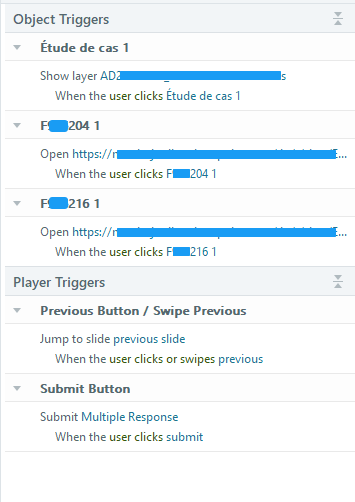
In the image you attached, the "jump to slide" trigger goes to the previous slide when the user clicks the Previous button. The Submit trigger runs when the user clicks the Submit button. Those are two different "whens." Their order in the Trigger Panel doesn't matter. The "jump" trigger appears first because "Previous Button/Swipe Previous" comes before "Submit Button" alphabetically.
- Trigger order matters when multiple triggers have the same "when." In that case, any "jump to" trigger needs to come last, because Storyline can't run a trigger if it's already left the slide the trigger is on.
You said that the incorrect feedback appears when you select the correct answers the first time in Preview but not when you replay the slide in Preview. Does that happen consistently? What happens in a published version of the course?
It's virtually impossible to tell what's going on without more info. Someone might be able to solve the issue if you upload the .story file. Here are the best practices for doing that:
- Only include slides that are related to the problem.
- Be sure objects, layers, motion paths, and variables have meaningful names.
- If there is proprietary content, replace or delete it. For example, replace proprietary text with “ipsum lorem” text.
In the meantime, here’s some standard advice that the staff usually offers:
-
Quit Storyline and relaunch it.
-
Be sure you only work on Storyline files located on your local hard drive.
- If that doesn’t help, try to repair Storyline.
Related Content
- 7 months ago