Forum Discussion

How can I delete unused variables?
- 28 days ago
Hello everyone!
Happy to share that we've just released a new update for Storyline 360!
In Update 118, we've included essential fixes and new features. We've released an enhancement for:
- Remove all unused project variables with one click.
Launch the Articulate 360 desktop app on your computer to take advantage of this update, and click the Update button next to Storyline 360. You’ll find our step-by-step instructions here.
Please let me know if you need additional help.


HI Deepak,
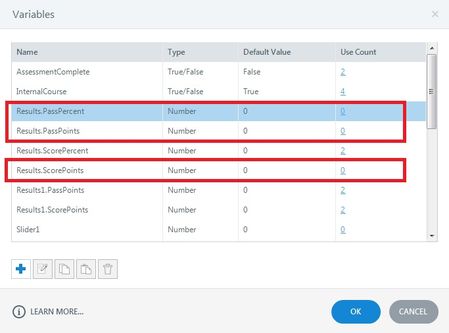
Those variables were created by storyline when a results slide was created. The second set was created when another results slide was created. Unfortunately, deleting the first results slide does not clean up the variables, and you can't access them to delete them. I've found the best thing to do is just leave them alone, and not worry about them.
If you really want to get rid of them, you can create a new project, and import all of your slides except for the results slides from the old project. Then you can start from a clean slate. I've done this, and id does work, but usually I find it isn't worth the extra effort, as the abandoned variables won't effect your course in any way.
Thanks Dave,
However, for me, probably these variables were creating some kind of confusion, my custom Review and Retry buttons were not clickable and the scoring was not visible (even though the triggers were fine). So, I wanted to delete those.
Anyways, as I was in time crunch, I simply deleted the result slides and recreated those while renaming unused result variables. Thanks anyways!
Related Content
- 5 months ago