Forum Discussion

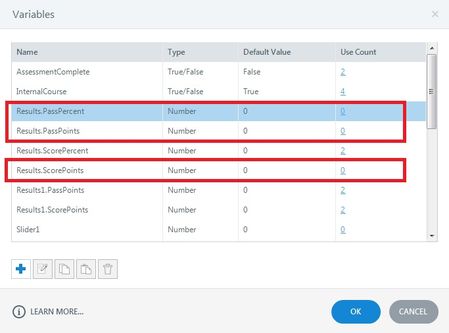
How can I delete unused variables?
- 29 days ago
Hello everyone!
Happy to share that we've just released a new update for Storyline 360!
In Update 118, we've included essential fixes and new features. We've released an enhancement for:
- Remove all unused project variables with one click.
Launch the Articulate 360 desktop app on your computer to take advantage of this update, and click the Update button next to Storyline 360. You’ll find our step-by-step instructions here.
Please let me know if you need additional help.


Hi Deepak:
You raise a good point in that there is currently no Storyline feature to quickly remove all unused variables in one step, menu click, or action.
The most common approach is to delete variables such as these one at a time.
However, if you reuse a project, as I often do, I tend to create newer variables and then stop using many of the older ones from the older project.
I'll try to stop by Articulate Storyline's request link later today and make a specific feature request for this, if it hasn't been covered already, of course (!)
-Mark

I asked while back for an option to purge unused variables at the press of one button additional feature request would help raise the profile of this!
Related Content
- 5 months ago