Forum Discussion

How to get waveform back in timeline audio?
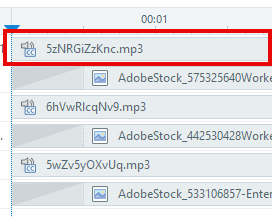

It's an annoying feature. But audio waveforms only show when the file plays by default. If you set the audio to play using a trigger then the timeline shows you the file name NOT the waveform.
- JohnJohnson-6a83 months agoCommunity Member
Annoying indeed..maybe the development team could add this as a 'quality of life' improvement?
- StevenBenassi3 months agoStaff
Hi JohnJohnson-6a8!
Glad to see the community has been helping you!
I noticed that you've also been working with my teammate Lianne, through a support case. As shared, in Storyline 360 audio waveforms from the Timeline will be converted into a TEXT.mp3 format if the file is associated with a 'Play audio X When X completes' Trigger. For all other combinations of Media Trigger actions and events, it is expected that the audio waveform in the Timeline will be converted as well.
I understand the preference for seeing the waveforms in the Timeline, whether or not there are Triggers associated with the audio file. We've submitted this as a feature request on your behalf!
We'll be sure to notify you if we release a future enhancement that helps!

Related Content
- 1 year ago
- 1 month ago
- 1 year ago