Forum Discussion

Lena1Post
1 year agoCommunity Member
Icons not available
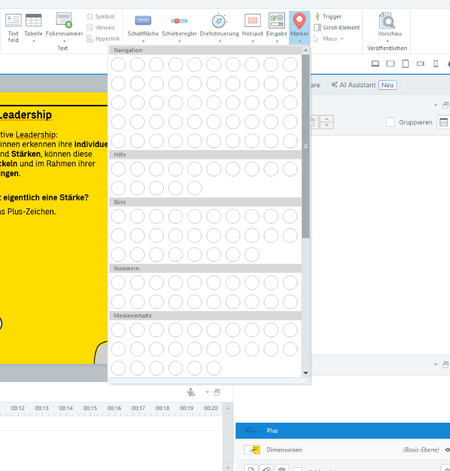
Hello, whenever i try to create some e-learning content with markers, the preview of the marker-icons is not available in my storyline. Does anybode else have this problem? Thanks, KR

HVfb0f498d-053b
1 year agoCommunity Member
If I create a new empty Storyline and add a marker and change the marker fill to black, the popup marker list/panel shows all black circles with no icons even though the icon colour was set to white. If I change the marker icon colour to black, the panel displays correctly (black circle with white icons)!
- StevenBenassi1 year agoStaff
Hi HVfb0f498d-053b!
Sorry to hear you've run into this setback!
I can confirm this specific behavior is related to a bug we have logged for Storyline 360. This bug causes:
- Icon color set to White for Markers, does not carry over to the 'Change Icon' drop-down menu.
I've linked this discussion to the bug report, so we can notify you as soon as a fix is in place. In the meantime, as a workaround, we suggest:
- Using the 'Marker Styles' shortcut menu to select Colored Fill - Dark 1.
- Selecting any other color for the icon color.
Thank you for your patience. I'm sorry if this has been slowing you down!

Related Content
- 9 months ago
- 3 months ago
- 6 months ago