Forum Discussion

Is there a way to adjust the icon color in the course resources?
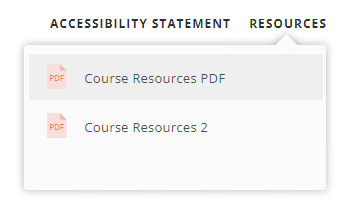

Developer control over all icon types within the Resources tab is crucial. From accessibility concerns to branding issues, this is important to all. Please take action on this, to allow us some editability.
- StevenBenassi25 days agoStaff
Hi KylePrice,
Thanks for adding your voice to this request!
I've shared your insights directly with our product team. In the meantime, can you walk me through what you and your team are currently doing to work around this limitation?
Context around real-world workflows helps our team make more informed decisions when prioritizing new features.
- KylePrice8 hours agoCommunity Member
Upon publishing locally, you can go into a portion of the code and modify the color settings of the icons. This process is less than ideal. Would love to have more simplified color control for the accessibility concerns and client branding considerations.
- Nedim6 hours agoCommunity Member
KylePrice You could possibly run JavaScript trigger on Slide Master so you don't have to publish locally to modify.
const resources = document.getElementById("resources-content");

// .file-icon-text
resources.querySelectorAll(".file-icon-text").forEach(text => {
    text.style.color = "#2196f3";
});

// .file-icon-border
resources.querySelectorAll(".file-icon-border").forEach(border => {
    border.style.stroke = "#2196f3";
});

// .file-icon-fold
resources.querySelectorAll(".file-icon-fold").forEach(fold => {
    fold.style.stroke = "#2196f3";
});


Related Content
- 7 months ago
- 10 years ago