Forum Discussion

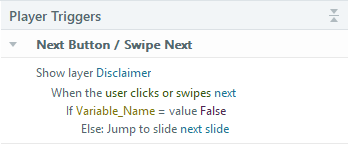
Little Tip About Conditional Variables

Niche, yes. Still nice of you to share this. 😁
SL looks for "jump to __" triggers to determine the layout in the Scenes panel and in Story View. So your solution to show the layer in the Else statement lets SL recognize the "jump to."
Personally, I like to disable Next until an interaction is completed, so it visually indicates that it's not clickable.
FYI: Here's my post about various ways to control the next button.
- Tiziano1 month agoCommunity Member
I also like to disable the NEXT button, that's my usual go-to, but there are certain situations where I think it's best to leave it clickable. If the learner thinks they completed the task but fails to miss something and the NEXT button is still disabled, they may not know what they've missed. However, leaving it clickable with the popup layer telling them they haven't completed the whole thing, helps reorient them to the task, in my opinion.
- JudyNollet1 month agoLegend
Agreed! The context is important. If it's not obvious what's required for completion, your hint-layer method is a good option.
Related Content
- 3 months ago
- 8 months ago