Forum Discussion

Little Tip About Conditional Variables
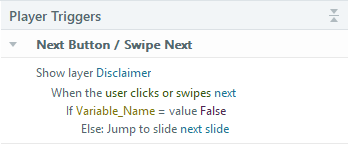

Hey all — building on what Judy said about disabling Next, here's the exact setup I use so learners can't skip ahead. This is the pattern I hand-test on every project with gated interactions:
Create a True/False variable called SlideComplete, default value False.
Add these two triggers on the slide:
1. Change state of Next button to Disabled — When: Timeline starts on this slide
2. Change state of Next button to Normal — When: Variable changes, SlideComplete — If: SlideComplete == True
Then wherever the interaction finishes (question answered, drag-and-drop submitted, video ended), add: Set SlideComplete to True.
The "when variable changes" trigger is the piece that makes it reliable. Storyline watches the variable and flips the button the instant it changes, so you're not fighting timeline timing or trigger order.

Note: If there's any chance the user might return to the slide, your 1st trigger needs a condition.
Why? Because a “when timeline starts” triggers runs every time the user reaches the slide—even if the Slide Properties are set to “Resume saved state.”
Using your example, the condition would be if SlideComplete = False. Since the variable would be True if the user completed the interaction on a previous visit, Next would stay Normal in that situation.
For those who aren't familiar with variables, be aware that a variable maintains its value until a trigger changes it. So to control the Next button on multiple slides by tracking completion with a variable, you need to use a unique variable for each slide.
- ronald-hicks1 month agoCommunity Member
You're absolutely right — good catch. On a revisit, the timeline-starts trigger fires again and re-disables Next even though SlideComplete is still True. Adding "If SlideComplete == False" to that first trigger fixes it cleanly. And the per-slide unique variable point is worth underlining — one shared variable across slides is a classic way to get mysteriously unlocking Next buttons. Thanks for tightening this up.
Related Content
- 3 months ago
- 8 months ago