Forum Discussion

CraigHadden
7 years agoCommunity Member
Non-breaking spaces in Rise?
Hi. Is it possible to insert a non-breaking space into a lesson name (or elsewhere)?
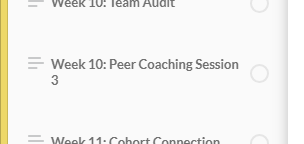
I have a lesson whose name ends with "...Session 3". When viewing the course, the 3 wraps to the 2nd line in th...
- 6 years ago
Hi there, Christine. On Windows keyboards with a number pad, you can use
Alt+0160to add non-breaking spaces to your Rise 360 text, including course and lesson titles. Yay!For now, it's not a feature that works with Mac OS. We'll let you know if that changes.


AndersCarlsson-
5 years agoCommunity Member
I found another workaround (based on Arith's suggestions). This works for me in Chrome:
- Right-click the paragraph where you want a no-breaking space.
- Click Inspect to bring up the inspector in your browser.
- Right-click the <p> tag that contains your text, then click Edit as HTML.
- Replace the existing space with the HTML character code for no-breaking space, that is:
This seems to work reliably and the no-breaking space is still there after I reload the page.
I also noticed that if you add more than one space in your text, Rise replaced all but one of those spaces with no-breaking space. So even if HTML has built-in protection against double spaces, Articulate has worked hard to allow you to make those typos. 😁

Related Content
- 7 months ago
- 1 year ago
- 1 year ago