Forum Discussion

Publish to Web with Rise
Hello,
Is there a way to publish to web with Rise? I only see LMS options.
Thanks
63 Replies
You got it, Agne! There are no specific requirements, but you can share this article with your client if that helps!
- ThomasRudolphCommunity Member
Hello everyone :)
Thanks for your insight! I have a question regarding the integration of the my rise 360 course into a WIX-Webpage:
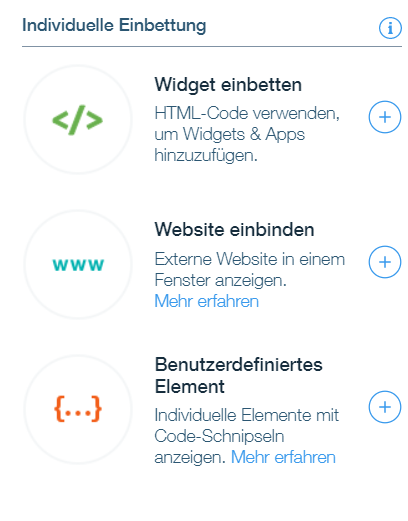
In Wix I have the following options:
- Embed widget
- Embed webiste
- Custom element
When I hit custom element I have the following two options:
- Server URL
- Velo Datei
Can you help me?
Best regards
Tobias
Hello, Thomas! I haven't used Wix before, but it looks like your best bet is to use Embed Widget. Then, follow the steps in this article:
- TraceyZarnCommunity Member
Hi,
Once I've exported to web, and the IT team has put the Rise course onto the SharePoint site, do I need to send them an export to web zip file each time I publish course revisions?
Thank you for your help.
Tracey
- KarlMullerCommunity Member
Hi Tracy,
Yes, every time you make changes to the course, you need to export the course again, and send the new ZIP file to your IT team.
- TraceyZarnCommunity Member
Thank you!
Get Outlook for iOS
- KatherineWin203Community Member
How do learners get a link to the index.html file? If I upload a zip of a Rise360 course that is web-only, can learners still click on interactions? If I were to upload the course into Thinkific as multimedia, what would the user experience be?
Hi there! If you upload your Rise 360 course to a web server, you'll identify the index.html file path, and share that URL with your learners. Your course will have the full interactivity that you would see in your Share link and an LMS!
I'll defer to folks who've used Thinkific, but I found these support articles on their page that could help:
- Uploading multimedia content: https://support.thinkific.com/hc/en-us/articles/360030739873-Create-a-Multimedia-Lesson#uploadcontent
- Previewing the content as a learner: https://support.thinkific.com/hc/en-us/articles/360030737873
- HilaryTramme566Community Member
To confirm...the zipped file has to go on a SERVER through IT in order for the Index link to work? We can't saved the unzipped files to the Sharepoint Site and then run the module?
Hi Holly,
Yes, it will likely work better if you host your content on a different web server rather than directly on Sharepoint. Sharepoint Online doesn't support HTML, which is how Rise 360 output is formatted.
- LaurenBostelaarCommunity Member
Hi E-learning heroes,
I currently working on e-learning courses in Articulate Rise for a client. When the client does not have a Learning Management System (LMS) in place, how can you share the e-learnings with a broader audience (the client) and provide them access to the e-learnings?
I tried to export the content via de Web option, but when I open or share the index.html I receive a blank page and the client as well.
Is it possible to share links to the e-learning (without progress tracking) via Sharepoint for instance?
Many thanks for your help.










Related Content
- 5 months ago
- 4 months ago