Forum Discussion

Resource tab missing only on 3 slide but checked in player menu
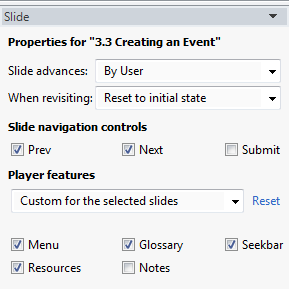

Hi Cheryl,
If you want to re-use the same glossary in another project, an easy way to do that is to save your project as a Storyline template. Then, when you're ready to begin a new project, use that template as your starting point by choosing From project template on the Storyline launch screen. When you repurpose content this way, the player customizations on the template (including any Glossary you've added) become part of the new project. If you later add, delete, or change any of the glossary terms, those changes won't automatically carry over to other projects in which you've used the same template. You'll need to make the same changes in each project.
You're coloring and screen size can also be included as a part of the Storyline template.
Also, I checked on your case and saw that John was unable to reproduce the behavior you've described and shared the following:
Please do the following to see if it resolves the issue you are experiencing:
1) Upgrade Adobe Flash Player here: http://www.adobe.com/go/getflash
2) Clear your browser cache. You can do this in Internet Explorer by going to Tools > Internet Options > General > Temporary Internet Files. Select Delete Cookies and Delete Files.
3) Also in Internet Options, on the Security, Privacy, and Advanced tabs, reset everything to its default settings. There is a button on each tab to reset defaults.
4) In Windows Vista / 7, go to Start > All Programs > Accessories > Run. In Windows XP, go to Start > Run.
5) Copy / paste the following line of text (depending on your operating system) into the Run dialog box. Click OK, and delete the entire contents of the window (folder) that opens.
Windows Vista / 7:
"C:\Users\%username%\AppData\Roaming\Macromedia\Flash Player\#SharedObjects"
Windows XP:
"C:\Documents and Settings\%username%\Application Data\Macromedia\Flash Player\#SharedObjects"
6) Close all browser windows for the changes to take effect.
7) Republish your file to a new empty folder on your desktop.
8) View the course and see if the resources tab is still missing on certain slides.
Related Content
- 2 months ago
- 1 year ago