Forum Discussion

Results slide won't display score
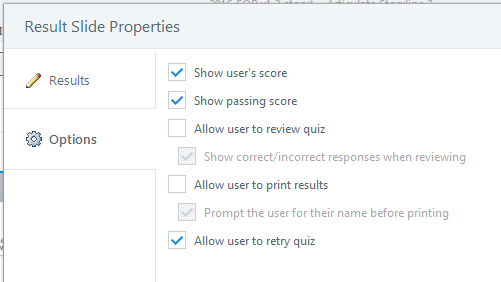
Hi! I put in a results slide for the post-assessment, following all of the steps carefully. When I publish the course and take the assessment, it does not display the score. It tells me whether I passed or failed, but it doesn't display the score or the percentage needed to pass.
I have checked and double-checked the results slide to make sure it is set up properly. I have deleted it and added a new results slide to see if that would work. Nothing is working.
Any idea why this might be happening?
Thanks,
Karen
17 Replies
- WendyFarmerSuper Hero
Hi Karen
when you insert a result slide - SL automatically creates 4 result variables. Can you check in your variables list and see if they are displaying.
- KarenPhelpsCommunity Member
Thanks Wendy,
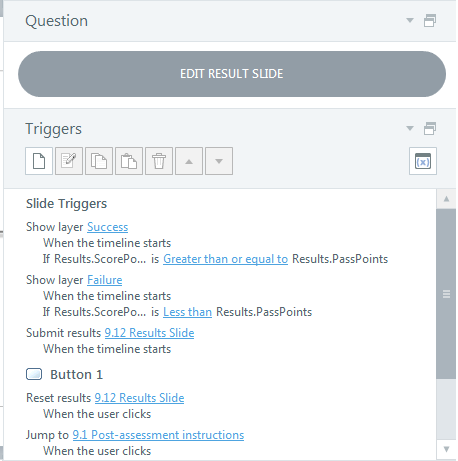
I've attached a screen capture of the variables window:
- Show layer "Success" when timeline starts if Results.ScorePoints is Greater than or equal to Results.PassPoints
- Show layer "Failure" if Results.ScorePOints is Less than Results.PassPoints
- Submit results 9.12 Results Slide When timeline starts
- Button 1: Reset results 9.12 Results Slide When the user clicks
- Jump to 9.1 Post-assessment instructions When user clicks
Any ideas why this isn't working?
- WendyFarmerSuper Hero
Hey Karen
the triggers look fine so check these couple of things:
- the result slide has your selected questions ticked
- that your questions have 'points' assigned - default is 10 points (don't worry about my example)
- KarenPhelpsCommunity Member
Yes, I selected each of the assessment questions, and yes, they each are worth 10 points. That's why it is so baffling. I have followed all of the instructions to the letter. But it still doesn't work, even though I've redone it several times.
- WendyFarmerSuper Hero
This is what I would do
Save the file, delete the result slide, and add in a new result slide - see if that does the trick.
If not, upload your original story file and someone will try and help you.
- KarenPhelpsCommunity Member
Yep, I've done that several times. Doesn't help.
- KarenPhelpsCommunity Member
I saved just the assessment as a "new" file (deleted all the lessons).
I deleted the results slide that was in the file and added a new one. Still doesn't work. :(
(BTW, when I imported the assessment slides into the new file, the formatting and states got all wonky. I didn't bother to fix that in this version.)
- WendyFarmerSuper Hero
There is corruption in your file - when I delete the result slide two of the variables that were duplicates remain so I deleted the result slide, created a new file and imported the story file in then created a new result slide. It's working as expected now.
- KarenPhelpsCommunity Member
I had tried the same thing earlier, but it didn't work. I'll try again.
Thanks Wendy!
- ChristiePollickCommunity Member
Hi, Karen -- I see that Wendy has stopped in to save the day! Please let us know if you are all set or if you are still having issues, and with respects to avoiding corruption in the future, please see this article for important guidelines: Follow These Tips to Reduce Your Risk of Corrupting or Losing Project Files.
- KarenPhelpsCommunity Member
Thanks Christie! I've been doing everything the article suggests except for one thing. I hadn't thought about the risk of leaving a file open over night. I'll never do THAT again!
Thanks for the help!
Karen
- KarenPhelpsCommunity Member
Wendy, I deleted the Results slide, saved the course, then imported your results slide, and it works! I am thrilled! Thank you so much for helping me with this!
- TennilleDarrowCommunity Member
I found this discussion because I was having the same issue! I downloaded Wendy's results slide and poof, it worked! I have been trying to figure this out for days now. Thank you!
- SaryKusumasariCommunity Member
Hello,
I overcome the same problem. I did follow the guidelines (as what above mentioned) but the problem still stay.
The score percentage don't show it's number. I have deleted the result slide, put new one but it stays the same. However I can't upload my work here (because privacy reason). Would you help me?
Thank you!






Related Content
- 15 days ago