Forum Discussion

RISE Review
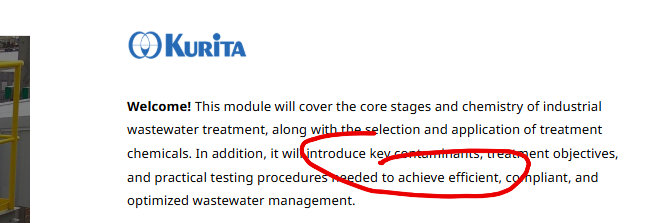
My manager used the screenshot annotation in Review 360 when leaving a comment and circled the words "key contaminants" roughly and when I looked at the feedback on my side, it showed the title circled. Do you know why this is? Should I be looking at comments when they use this feature? Everything goes under feedback, so do I just check that area randomly ?
4 Replies
Hello SarahLichy,
Thank you for sharing a screenshot with us! I understand that your manager circled "key contaminants" using our Screenshot Annotation feature in Review 360, but the annotation appeared around the title when you viewed it. When testing this on my end, the annotation stayed in the same location when I viewed the comment. I'd love to learn more.
- Is your manager commenting on the same version you're viewing, or was a new version published after the comment was left?
- Is this happening with just this comment or with other annotated comments as well?
- Which browsers are you and your manager using? I'm curious if an incognito window changes your experience.
As for your second question, all comments, including those with annotations, appear in the Feedback panel. Clicking a comment there should take you to the relevant slide or page and display the associated annotation. When authoring in Rise 360, you'll want to click the Comments button to open up the Comments panel.
We'd be happy to take a closer look at a screen recording of this behavior in a support case if you're still experiencing a change in the annotation location when viewing comments.
Looking forward to hearing from you!
- SarahLichyCommunity Member
- Is your manager commenting on the same version you're viewing, or was a new version published after the comment was left? Yes, same version. When I go into Review 360 and look at feedback, it shows he randomly circled the title.
- Is this happening with just this comment or with other annotated comments as well? First time we tried this.
- Which browsers are you and your manager using? I'm curious if an incognito window changes your experience. I always use Google Chrome. I went incognito and same thing.
When I clicked comments in RISE 360, shows no pictures on where comment goes to! Under feedback in Review 360, it shows the circled title, but when I click in Review 360 under comments, I see the screenshot annotation. I did add my manager as a collaborator to. Could this affect anything? I did share the link via review to him though. I gave him collaborator rights incase he just wanted to go in and first something!
Hi SarahLichy,
Thanks for answering those questions! From what you've described, it sounds like the screenshot annotation displays differently depending on whether you're viewing it from the Feedback panel or the Comments panel in Review 360, which isn't what we'd expect. Adding your manager as a collaborator in Rise 360 shouldn't affect how screenshot annotations are displayed in Review 360.
Since you've confirmed you're both viewing the same Review 360 version and the behavior persists even in an Incognito Chrome window, I'd like our support engineers to take a closer look. I've opened a case on your behalf. We'll be in touch shortly via email to learn more. We appreciate your patience.


Related Content
- 1 year ago
- 1 year ago