Forum Discussion

RISE to create eBook
I am considering using RISE to transform a printed book into an eBook. The RISE course would have 25 Sections and 6-10 lessons within each section. Does anyone have an example of a RISE course of this size, or any experience with the useability of a course with large amounts of content in the left navigation bar? Or performance issues?
I started to build a sample (3 sections and 1-2 lessons) to get a feel for what it might be like, but I am wondering if the final product would become unmanageable for the user. Thanks.
https://share.articulate.com/CWvdQt0jPRVBZ_5HwXNha
5 Replies
- AngeCommunity Member
JimMurtagh-bd85
For my needs Rise navigation out-of-the-box is too basic and limited re: design customization, UX, UI, making for a cumbersome and frustrating user experience, more so if it's a long course. If you have to use Rise you could play with branching, various interactive blocks, javascript... but that route can be laborious and complex. Dedicated ebook creation software? - PhilFossCommunity Member
Hi Jim, I ran into that issue with the navigation becoming unwieldy. You might be interested in this customization that automatically collapses the inactive sections, and expands the current/active section.
One thing you may have noticed with Rise though, out of the box you're stuck with the automatic numbering of lessons/chapters, if you had an intro/forward it would treat that as chapter1.
- JimMurtagh-bd85Community Member
That is a great customization. I like the vertical bar across the whole section, the shading and the thin sections. Can you point me to instructions to make that change? I switched to the Apex template but my sections appear very tall compared to your example and I don't have the vertical bar across the section. Thank you.
Hi, JimMurtagh-bd85!
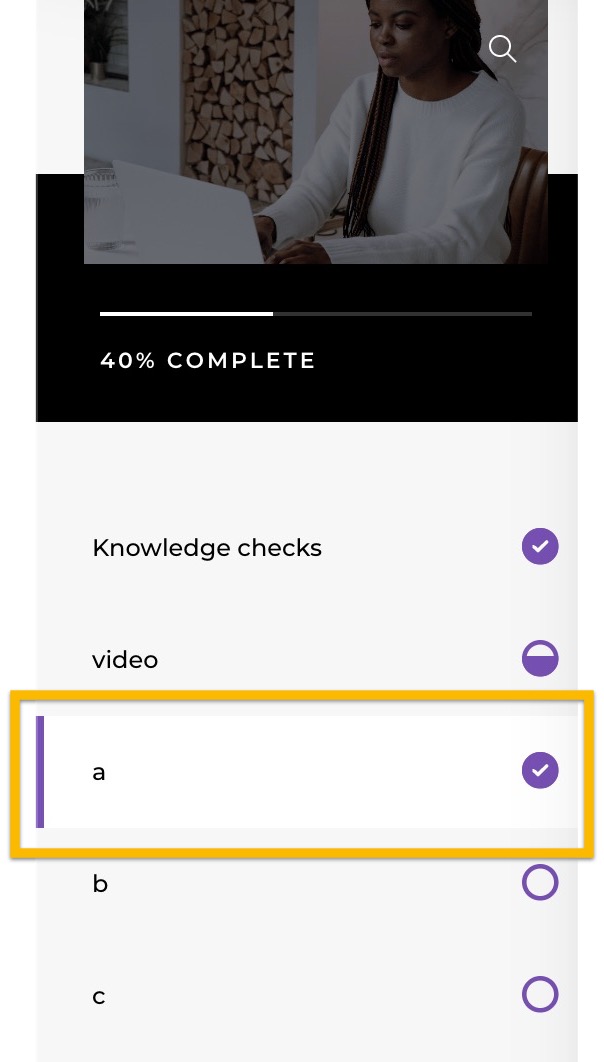
I tried creating a similar look to what PhilFoss shared. Have you tested the Horizon theme? In my sample course, a vertical line appears to the left of the lesson. Please let me know if that's not what you're referring to!
- PhilFossCommunity Member
Kelly, thats a good observation. The Horizon theme is the worst so I rarely use it. But what you're showing is the current lesson. My 'supermenu' modifies this to also indicate the current section as well as current lesson. If you've ever authored a course with several sections you'll understand how important this is.



Related Content
- 10 months ago
- 10 months ago