Forum Discussion

allennation-602
21 days agoCommunity Member
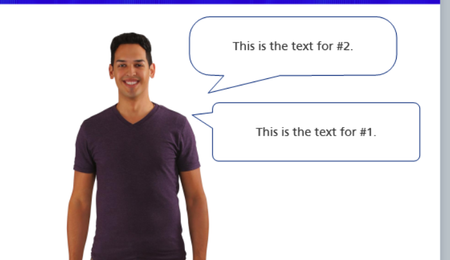
Rounded Corner Speech Bubble
Is there a way to keep the text box from turning into a balloon animal when you move the pointer? The text boxes in this image are identical except for the pointer is moved. I know I can change the ...
allennation-602
19 days agoCommunity Member
Here is an example

DShaw
19 days agoCommunity Member
All four bubbles in your example are the older caption-style callout, not the callout from Insert > Shape > Callouts. To fix I'd swap to a shape callout. Insert > Shape > Callouts > “Rectangular callout (or whichever you choose) ”. Its corners belong to the rectangle, so moving the pointer won’t change them. Once you have one bubble the way you want it, you can right-click > Set As Default Shape so new ones start from that.
Related Content
- 1 year ago
- 7 years ago