Forum Discussion

MichellePrince
13 years agoCommunity Member
Send Email action not working
Hi
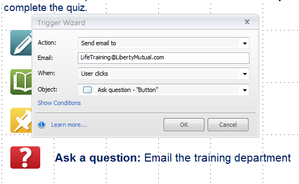
I just previewed my published course and the send email action is not working. My course has a slide with a trigger to send an email to our training mailbox when the user clicks the designated...

AshleyT-Pollard
13 years agoStaff
Hi Michelle,
There are a few known issues with why an email trigger would not work within Storyline.
When adding an email trigger to your Storyline course, be aware that there are certain requirements that must be met by each user’s computer for the trigger to function properly:
- The user must have an email client installed (for example, Microsoft Outlook), and they must have an account configured in the program.
- The email client program must allow JavaScripts and HTML submits. Some programs, like Lotus Notes and Groupwise, do not allow these features. Therefore, they will not work.
Tighter security restrictions in modern web browsers, operating systems, and anti-virus programs can also interfere with this process. We recommend testing your content in its final environment to determine if the email trigger will work for your users.
Related Content
- 10 months ago
- 10 months ago
- 12 months ago
- 10 months ago
- 11 months ago