Forum Discussion

Send results slide via email using Javascript ??
Hello! I'm pretty new to... well... all of this, but I'm a fast learner. I've been toying around with adding Javascript to my Storyline project for some advanced capabilities, and so far I've figured out how to execute an email with HTML5. I understand that there are issues with mobile and Flash.
So my question is: is it possible to set up Javascript within my Storyline project that will email an image of the results slide/certificate of completion?
It would be great if the image could be in the body of the email, but I would also be happy if it were an attachment. I don't know if it is possible to set it up so that once the user lands on the results/completion slide, there is an image automatically generated and included in the email.... again, pretty new at this. =)
Here is my current set up (for my test project) including code:
- I set up a text entry called "EmailAddress" - the user will enter their desired email addresses in here.
- I have a text variable called "EmailAddress"
- I added a trigger to a button that will execute Javascript when the user clicks.
This is the Javascript I'm using:
var player = GetPlayer();
var course="Storyline test course"
var email=player.GetVar("EmailAddress");
var subject="Assessment Complete";
var body_start="I've just completed my assessment!";
var mailto_link='mailto:'+email+'?subject='+subject+'&body='+body_start;
win=window.open(mailto_link,'emailWin');
Please note: I've patched my JS together from information I've found within these forums and on the web. I don't know how to write JS or all the rules, but I can usually figure out how to use it if I play around with it for long enough.
Any help would be amazing, and thank you so much in advance... and sorry if this question has already been covered; I wasn't able to find an answer anywhere. =)
30 Replies
- JacekChrabąszczCommunity Member
Hello,
You can simply send emails joining JavaScript and PHP, e.g. in Execute JavaScript put a simple script
var player = GetPlayer();
$.ajax({
url: "quiz.php",
type: "POST",
data: {"student" :player.GetVar("student"), "score":player.GetVar("score")},
success: function(data)
{
alert("Success" + data);
}
});
In the folder with story_html5.story you can add -let's say- quiz.php:
<?php
$message .= 'Hello!' . "\r\n\r\n";
$message .= 'Student: ' . $_POST['student'] . "\r\n\r\n";
$message .= 'Score: ' . $_POST['score'];
mail("your@address.com","Quiz 1", $message);
?>And you will receive an email:
Subject: Quiz 1
Hello!
Student: e.g. John Doe
Score: e.g. 21
Of course you can add many variables from Storyline in your $message.
Best regards
Jacek
Thanks Jacek for sharing the code here - always helpful to have more information for the community on utilizing Javascript.
- JacekChrabąszczCommunity Member
Hello Ashley,
my example is too simple, e.g. when sending mail, it must contain a "From" header. It shouldn't be anonymous, then I have to rather use sth like this:
. $- BjWilsonCommunity Member
What do you mean by use .$ Could you please explain further with an updated example of the code.
Could you add something like this to add in your from address to the php code:
$headers ="From: My Site <admin@mysite.org>";$headers .= "\r\nContent-Type: multipart/alternative; boundary=\"PHP-alt-".$random_hash."\"";
It may be just what someone else needs though! You never know. :-)
- JacekChrabąszczCommunity Member
I hope so :-) Then I'll elaborate on this subject.
W dniu 2014-11-17 20:18:23 użytkownik E-Learning Heroes napisał:
Reply to Send results slide via email using Javascript ??
Ashley Terwilliger replied:
It may be just what someone else needs though! You never know. :-)
Reply
View
To post a response, simply reply to this email.
You received this email because you subscribed to this discussion. Unsubscribe
© 2014 Articulate Global, Inc. All rights reserved.
Thanks Jacek - and just so you know when you reply via email sometimes your signature is included. You can edit the post if you'd like to remove those elements!
- JacekChrabąszczCommunity Member
Thank you Ashley :-)
W dniu 2014-11-17 21:38:14 użytkownik E-Learning Heroes napisał:Reply to Send results slide via email using Javascript ??
Ashley Terwilliger replied:Thanks Jacek - and just so you know when you reply via email sometimes your signature is included. You can edit the post if you'd like to remove those elements!
- MrYCommunity Member
Has anyone actually got the to work as I'm having trouble. Has there been a Screenr created. I've had a good look here but most of the posts and tutorials aren't complete.
Thanks
- JamesWerlingCommunity Member
Hello this is a great thread. What I want to know are the Vars in the Js vars that you set up and populate with story line controlls?
- TabathaWillis-5Community Member
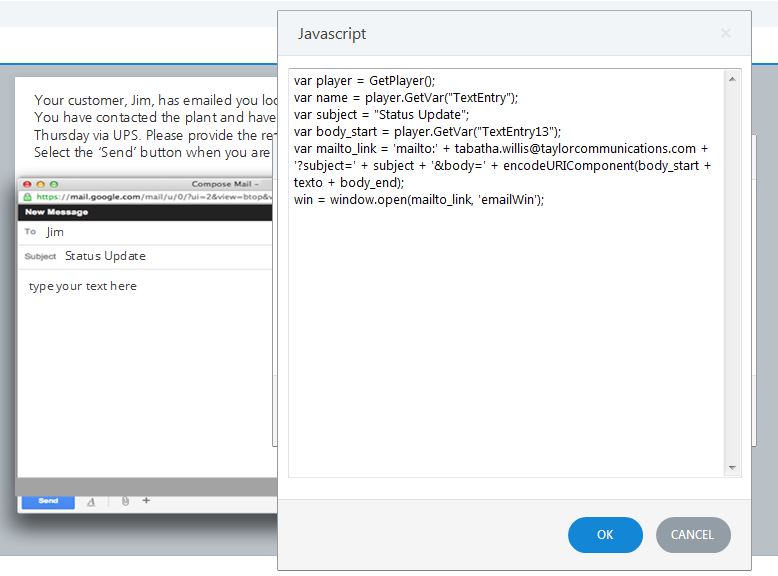
I am creating a course where the user will simulate replying to an email. I need their reply to actually email to be manually reviewed and graded. This is primarily for soft skills training. I've used different java codes listed in these forums, but none seem to be working. In the image attached, the "type your text here" area is what would need to be emailed. This is TextEntry13 in my course. If I could include the subject and the users name "TextEntry" that would be awesome.
Any help would be greatly appreciated.
Hi Tabatha!
This thread is a bit dated and your request is out of the scope of Articulate support, but hopefully someone in the community will be able to chime in and assist here. If you were hoping for assistance from a particular user, you are welcome to reach out to them directly via the 'Contact Me' option on the user profile if available.
- VandanaPa-fcf58Community Member
Hi,
I am creating a course where I want learner to paste a URL in a text box and that URL should be mailed to his / her reporting manager. How do I do this?
Hi Vandana,
You may want to begin by reviewing the information here in regards to the Javascript best practices as that'll be what is needed to get this set up. It's not something our team can assist with, so you're also welcome to contact Travis or others in this thread directly using the "contact me" button on their profiles to see if they're able to share additional information with you here.