Forum Discussion

ChantelleNash
15 years agoCommunity Member
Sharing Our Work
Hi all,
I was searching around the site and just noticed that there isn't a section for members to share their work with the community if they've utilized any of the assets or tips (or at least I...

JamesBrown
15 years agoCommunity Member
Chantelle,
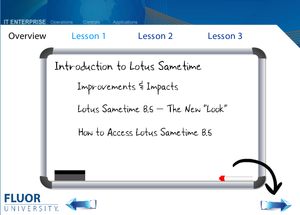
You have a nice start and here are some things you may wish to change. (see below)
- First make your top row navigation two colors.
* Dark Blue for the tabs you are not on.
* Light Blue with for the tab you are on. - Next add a box around the lesson you are currently on. This reinforces where the person is in the project.
- I would add bullet points. Don't use traditional ones. Come up with something that's your own. Maybe dry eraser markers. I generally don't like to use bullet points but in this case you need them to clearly breakout what is being taught.
- Your navigation arrows definitely needed some help. They just didn't seem to go with the rest of the project which goes against the CARP principal.
- Optional -- Add text to your arrow. You may be wondering how the heck I made the text curve. You can use text alignment in Power Point. I cheated and aligned the text to a path in Adobe Fireworks.
Hope that helps.
Related Content
- 12 months ago