Forum Discussion

Slide advance bug in Storyline 360?
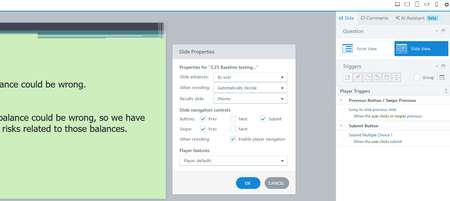

I'm not sure what you mean by "When I quit talking the slide advances." Is the slide advancing before you click the Submit button? If so, I suggest you submit a case to the support staff.
If it advances after you click Submit, that is expected behavior.
The Submit__ trigger actually performs two actions.
First, the trigger scores the question. This information is used by any associated Results slide.
What it does next depend on whether or not the question slide is set to provide feedback.
- If there is feedback, the trigger shows the Correct or Incorrect layer, based on the user’s answer. If the question allows >1 attempt, it will show the Try Again layer as needed.
- If there isn’t feedback, the trigger jumps to the next slide.
Changing the names of the Correct and Incorrect layers breaks the built-in functionality for showing those layers. The Submit__ trigger will jump to the next slide. So always keep the default names.
If the names are okay, but the Submit__ trigger isn’t showing the feedback, try resetting the question.
- In QUESTION TOOLS > DESIGN, switch Feedback to "None." This makes the layers disappear.
- Then switch Feedback to "By Question" again. This creates new Correct and Incorrect layers, and the Submit__ trigger should show the appropriate layer.
- BrandonTecca3 days agoCommunity Member
The slide advances without hitting submit, so I'll submit to support as suggested, thank you.
- JudyNollet3 days agoSuper Hero
You're welcome. Pay it forward when you can. And good luck with your case! 😊