Forum Discussion

PaulJamesAbe206
6 years agoCommunity Member
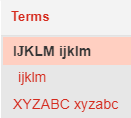
Storyline 360 Glossary Selected Terms - Font Face Error, Bug
There is a bug in the glossary terms where some letters font face becomes Times New Roman when selected. All of my team mates tested and have this bug so I think this is not an isolated case on my ...

TrishChin-122b3
6 years agoCommunity Member
Hi Paul and Vincent,
We are experiencing this with a new course we're developing, and have noticed that the issue is occurring for us with lower case p only, in the headings of the glossary term when the term is clicked. Please see published example https://360.articulate.com/review/content/230f842e-5cf1-4925-a253-fd3256c9529e/review
We are using the classic player and the player font is Arial. If the developer shares the project Team Slides, I can't seem to correct it. Deleting the offending items and re-adding them doesn't resolve the issue.
Also attaching SL file for your reference.
Related Content
- 9 months ago
- 10 years ago
- 11 months ago
- 12 months ago