Forum Discussion

Storyline 360: Text Entry box different size in Review from Preview
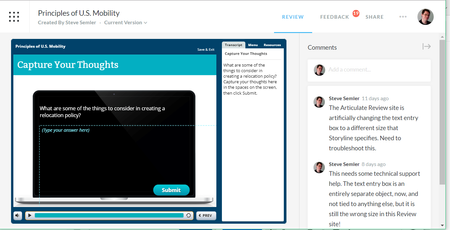

My text-entry boxes look great in edit mode (like Steve's, above) but go wonky in Preview or Publish modes. Oddly, the text-entry boxes look fine In Preview or Publish modes when I minimize the tab/window, click Zoom-to-fit (but the canvas shrinks a lot), or view them in tablet view; they also look fine to other people on other computers, here at my office or at Articulate.
After reading this thread, I removed my fancy border around the boxes as well as a custom-made photographic fill, and that did the trick. That said, it would be nice to customize text-entry boxes as we can do for regular text boxes.
Further, there must be some issue with my computer settings because several other people at my office and at Articulate had no problems. Is this a browser issue, as someone suggests above?
Note: I had my display driver updated to no avail.
Please advise. Thanks.
- BeccaLevan4 years agoCommunity Member
Sorry you're facing this issue, Mary! I see you're working with my teammate Taylor in a support case. I appreciate you sharing what fixed this for you! Be sure to follow up with her if you have any other questions!
