Forum Discussion
Storyline Quiz Review - Is the Incorrect/Correct message editable?
Just watched Jeannette's great screenr on creating customized Quiz Review slides. In addition to this customization, is there a way to move/edit the "Incorrect" and "Correct" text rectangle that appears at the bottom of each review slide? I don't think it was customizable in Studio Quizmaker, but maybe it is in Storyline? Thanks!
128 Replies
Hi Helene,
What text are you looking to edit? You mentioned already editing it in English - are you unable to make the changes in that same location for Spanish too?
- HeleneCaura-YanCommunity Member
Hi Ashley
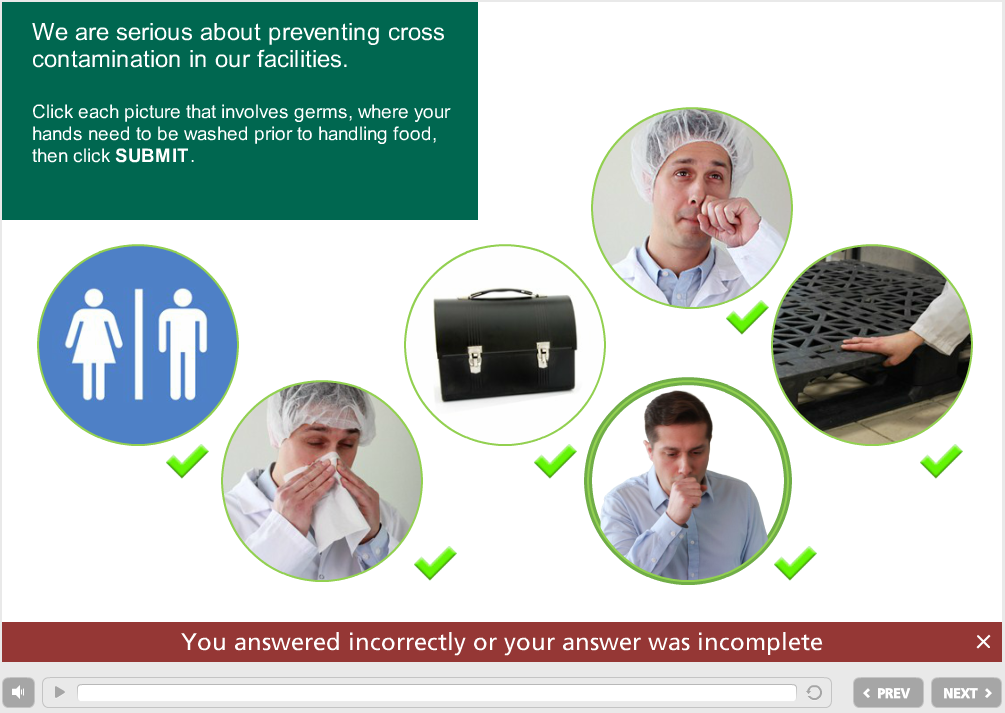
The text I want to change is the correct and incorrect text at the bottom, in the review layer (as pictured in this thread already). I *think* I edited it in English, since the text I have is "Your answer is incorrect or incomplete" instead of the by-default "Incorrect", but I can't remember how I did this.
Hi Helene,
The text in that bottom portion is not editable - so if you did edit it somehow, it wasn't using a support method within Storyline. If you modify the player language though, that should update that text automatically to show Incorrect/Correct in the language of choice.
- HeleneCaura-YanCommunity Member
I must have dreamt it then... Is there an unsupported method that I could have followed?! Thank you.
I can't think of one...I know as shared earlier in this thread, there are ways to have a review layer that covers up those elements and therefore you could edit the text as you see fit.
You may want to try sharing a copy of the English version you edited here so that other users could take a look and see if they're able to determine ideas on how you edited it.
- HeleneCaura-YanCommunity Member
Yes, I edited completely the review layer for one of my courses, but this module I am referring to is using the by-default layer. I thought the by-default text was just "incorrect", but it is actually "Your answer is incorrect or incomplete." That's all!
Hi Helene,
Could you share a copy of the .story file or an image of a slide with this? I want to make sure we're talking about the same set up.
- HeleneCaura-YanCommunity Member
Thanks Helene - it sure looks like the real thing. :-)
I don't know anywhere that you could change that, unless you're modifying the published output or creating a strikingly similar set up on your own review layer and choosing to show the correct vs. incorrect based on the states of the question buttons or variables.
- SteveFlowersCommunity Member
Under player and text labels, the updates to IncorrectFeedbackTitle and CorrectFeedbackTitle affects both the feedback text block in the feedback layer as well as the overlay at the bottom of the slide in review mode.
- HeleneCaura-YanCommunity Member
oooh... Yes! That's it! How could I've missed it? I went through this list 4 times... Thank you Steve! So the text IS editable Ashley, great news!
Thanks for the reminder Steve - I always just equate that with the feedback layers themselves!




Related Content
- 10 months ago
- 10 years ago
- 10 years ago