Forum Discussion

Text alignment is not in proper
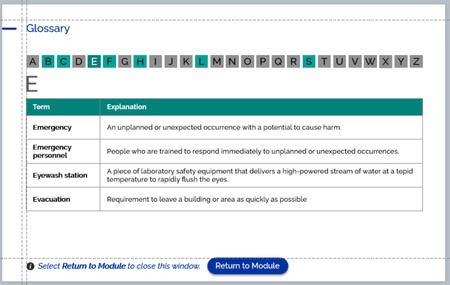

because of missing fonts (Raleway)*, I cannot test it on my computer
but there are known problems with text in tables when using text style
important: don't publish direct after opening the .story file, first go to
your slide with tables and press publish
if this don't help, try to reformat all text in table cells without using (custom) text style
you can open a support case
send them a .story file and screenshots of tables from exactly this file with the text format errors
and the link to this thread
* my computer is not compatible with Adobe Cloud Fonts
UPDATE: I have found the font "Raleway medium" from another source and could publish
publish direct after opening .story
https://360.articulate.com/review/content/5cc12eb6-da59-494b-be7a-46c0227507f3/review
close storyline and then publish after click one slide with tables
https://360.articulate.com/review/content/aaa1030a-00c3-4c2d-9ccc-7205743f5880/review
=> text position is different
my support ticket (Case #03122145) with this problem is open since march an not solved
Jürgen
Related Content
- 3 months ago