Forum Discussion

KevanNorr
1 year agoCommunity Member
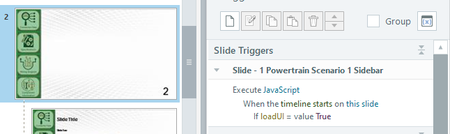
Trigger panel does not update to currently selected Slide Master
For some reason when I am trying to edit the triggers on a slide master layout, the trigger window typically only shows the first Slide Master.
In this image you can see that the Scenario 2 ...

JudyNollet
1 year agoSuper Hero
That is what's politely called "unexpected behavior." I suggest you submit a case directly to the Articulate staff. You can do that here: https://access.articulate.com/support/contact
FYI: Here are the usual steps to try:
- Be sure you're working on a local file.
- Quit and then relaunch Storyline, and see if the issue clears up.
- Uninstall and then reinstall Storyline, and see if the issue clears up.
Related Content
- 3 months ago
- 6 months ago
- 1 year ago
- 10 years ago