Forum Discussion

Unable to delete a trigger in Storyline 360
- 7 months ago
Hi Judy,
Thank you for your reply.
I tried the solutions suggested in the guide (restarting, reinstalling Storyline, checking the file location, and changing Windows settings), but unfortunately the problem persisted.
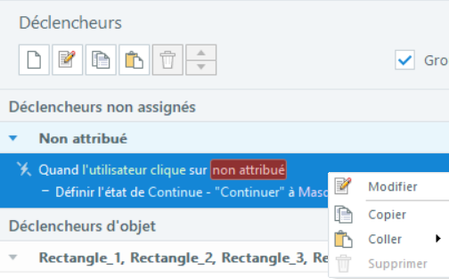
I finally found a workaround: I first duplicated the trigger, which then allowed me to delete the entire trigger group.
It seems that once duplicated, Storyline allows the trigger group to be deleted without any issues (although it still seems a bit strange!).
Thanks again for your help.

That is what is politely called "unexpected behavior." Here is some standard advice that the staff usually offers:
Be sure you only work on Storyline files located on your local hard drive.
Quit Storyline and relaunch it.
If that doesn’t help, try to repair Storyline:
If all that fails to help, submit a case directly to the Articulate staff. You can do that here: https://access.articulate.com/support/contact
- SafeTeamAcademy7 months agoCommunity Member
Hi Judy,
Thank you for your reply.
I tried the solutions suggested in the guide (restarting, reinstalling Storyline, checking the file location, and changing Windows settings), but unfortunately the problem persisted.
I finally found a workaround: I first duplicated the trigger, which then allowed me to delete the entire trigger group.
It seems that once duplicated, Storyline allows the trigger group to be deleted without any issues (although it still seems a bit strange!).
Thanks again for your help.
Related Content
- 10 years ago
- 1 year ago