Forum Discussion

Variables not working with conditions and triggers

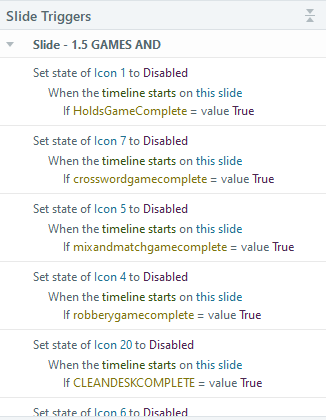



I see no reason to use a custom NewState instead of Normal as the default state.
Disabled and Visited are built-in states. That means they come with some automatic functioning:
- When an object is Disabled, it can't be clicked. In other words, any triggers attached to it won't run. I assume you know this, and you are changing each icon/button to Disabled after the associated section has been completed so that the user can't return to it.
- When an object has a Visited state, it will automatically change to that state when it is clicked. (As noted above, it can't be clicked if it's Disabled.)
- Triggers that change an object to Visited often cause problems, because they're duplicating what's going to happen automatically.
- Try using a custom state instead of Visited.
I think it makes sense to use a T/F variable to track whether a section is done, because there are only 2 options: not done (False) or done (True).
You should double-check the variables in the triggers and their values. For example, add a temporary text box to the menu slide that references the variables. That's a good way to ensure the have the value you expect.
By the way, your development and troubleshooting would probably be easier if you gave meaningful names to all the objects involved in interactions.
- GennaWilliamson2 years agoCommunity Member
Thanks Judy! It NewState was advice I received from another developer, so I tried it out. Thanks for the guidance!
Related Content
- 3 months ago
- 1 year ago
- 1 year ago