Forum Discussion

New in Labs: AI Avatars
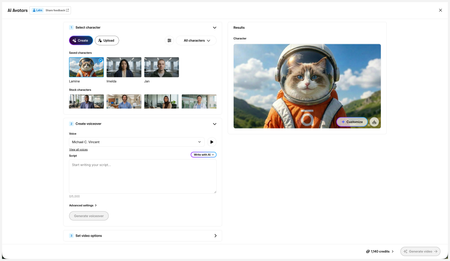
- 2 months ago
Hi everyone,
We’ve just released a few exciting enhancements to AI Avatars, and we’d love for you to check them out! Here’s what’s new:- AI Avatars in Custom Blocks
- AI Avatars in Storyline 360
- References
- Use References to guide character generation with your own visual assets. This is now available in the Create and Customize Character workflows.
- Quick Prompts
- Choose from prebuilt prompts for style, framing, presentation, pose, environment, clothing, and expression. Available in the Create and Customize Character workflows.
- Tips
- A new Tips icon is now available in the Create and Customize Character workflows to help you get even better results.
- Delete and Rename Saved Characters
- Keep your library organized by renaming or deleting saved characters.
- Upload Character
- Upload your own character to your Saved Character library.
- Download your Avatar Video
- To download your avatar video, click play, then select the Download icon in the lower-right corner.
As always, we welcome any feedback! You can share that here in this discussion, or use this feedback survey link!

Is there a way to access all the videos you've created/used credits to produce? Somehow I've lost a vid, or accidentally deleted it. And I know I actually created it bc I kept a tracker of how many credits each one cost, and that matches the remaining credits left in my account. Any suggestions?

Hi, JenniferSweeney!
Currently, there's no way for the author to retrieve a deleted video. You can find the static image of a character if you open AI Avatars > Saved Characters.
I understand how having the ability to access all videos created would be helpful, so I've logged this internally!
Related Content
- 3 months ago
- 5 months ago
- 5 months ago